@Kabron
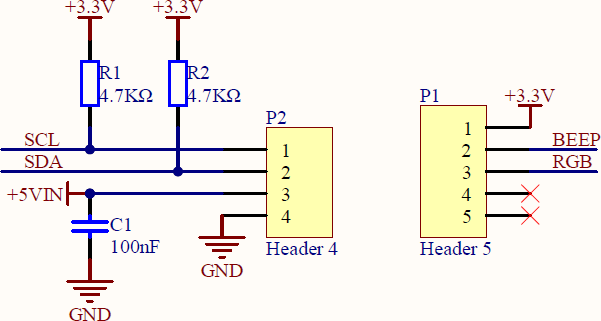
What about P1 and P2?

@dingfanshou said in key:
Why can't it connect even though the password is the same?
In the config I see "Start Mode" is "USB Mode". This means, your device is not connecting to WiFi at startup unless a previously stored program does. Change the mode and try again.
You may look for something like this: https://www.tindie.com/products/climateguard/dosimeter-with-i2c-radsens-arduino/
@rwp908 I do not know any existing. But you can use any Geiger counter kit e.g. equiped with a SBM20 tube or similar that has a pulse output and just use the S3 to count those pulses.
PA Hub is a I2C expander. That means it modifies/replaces the device addresses so it can handle more devices even with the same address. To make this work the software has to decode the "new" address of the device.
PB Hub is a GPIO expander. That means, it simple adds GPIO ports and convert them to one upstream I2C. As with the PA Hub the software has to decode the data.
PDM microphones usually have an output which is electrical close to I2C but still different in the data part (e.g. no addressing). PA Hub is for I2C so it will not work. PB Hub may work if it is fast enough to read the clock and data and decoding the data stream on the Controller. I'm not sure if this is really fast enough.
When looking to the schematic on the back side of the unit then you will see the signal paths:
Connecting the MIDI IN direct to the SAM2695 is not prepared.
You have to go thru Groove port to do that. It may work if you just bridge the TXD and RXT on the port with a jumper wire (don't forget the 5V supply). Otherwise you have to go thru your processor and put everything what is coming in direct to the out.
@andrew-winton did you connect the sensor +5V to the +5V and GND to GND of the RPi? Are you sure not having crossed the clock/data pins? I speak from experience... spent more than one hour for a simple failure like this.
When powering on the 5V can you measure if the 3.3V inside the sensor is correct?
@marcelusvictor Did you put the Cardputer into Download Mode as described here? https://docs.m5stack.com/en/core/Cardputer
If Yes, check your device manager if the COM port appears without any error message. If it not apears then your USB cable may be broken or has power wires only (cross check with another one).
I guess this is a voltage level issue on the power supply for the sensor. M5 Groove Ports use 5V, RPi use 3.3V. Internally the AIN4-20mA use 3.3V (there is a voltage regulator between Groove port and the converter, see the schematic on https://docs.m5stack.com/en/unit/AIN4-20mA Unit) and 5V for the OP-Amp. You may supply the unit with 5V.
@mgrouch KMeter is just the thermocouple converter. The TC insulation itself can be made from plastic or silicon or it can be made from glass fabric. It can also be inside a stainless steel housing or whatever. It depends on the application.
I just did a quick search for exhaust thermosensors and there are many K-type thermocouple in different housing available. As long as they have a TC connector or open wires for mounting one by yourself you can use them with KMeter.
I strongly recommend you to read the basics about thermocouples and how they work. You may than understand, that this "plastic thing" can be and should be far away from the high temperature exhaust.
By the way: If you feel better with the MCP9600 then buy one from e.g. Adafruit and use it with its library in the Arduino environment. You controller can still be M5. As for the KMeter the MCP9600 breakout is not made to put in the exhaust as well.
@konacurrents You wrote "I'm not using RC-5 with my ESP32 M5 controllers" and in the next posting "eg. the IR doesn't turn the TV on"
So do you want to remote control a TV or another device? If you not using RC-5 what alternative protocol does your device use?
For the mentioned test by the mobile phone camera: Test if ANY working remote from TV or HiFi etc... is visible by your mobile phone camera. Point the transmitter to the camera and press a button. If you see a flashing light, then your camera is able to see the IR light.
Now do the same at the M5StickCPlus when one of the examples is running.
If there is no flashing IR then investigate on the port number of the IRLED on your device and change it in the code to the right one. If it flashes but your receiving device is not reacting to it, it may be a wrong protocol or command.
It may help if you post the code you are trying and a description of what exactly you want to control.
Most IR Remote use RC-5 coding. See https://en.wikipedia.org/wiki/RC-5
Often the IR LED is pulsed with high current on very low duty to increase the working distance (refer the datasheet of your IR LED for maximal pulse ratings). If you have a "normal" IR LED on a GPIO it might be less effective. In this case you have to try very close to the receiver.
Unfortunately you did not post your code so no one knows how you try to send the midi messages.
Check first: does the device apear as USB-MIDI-Class in your computers device manager?
Probably it is shown as a USB-Serial-Class device (which MIDI indeed is) but your MIDI application (seems to be a top secret application as you don't wrote which one) expect a MIDI-Class device.
Maybe this helps: https://github.com/esp32beans/ESP32USBMIDI
@erkel
This sounds like a poor solder joint at the internal voltage divider (the 11k and 680k resistors).
@tspycher
AFAIK: this are very simple transmitter/receiver modules. No protocol, no encryption, no guarantee for transmit/receive the correct data. You have to make your own protocol and data integrity functions.
Try to send something out from UART (not faster than 10kbps) and receive it on the other side. Be aware that disturbance could be possible as 433.92MHz is used in a wide range of applications like wireless thermometers, garage door opener, car keys, wireless doorbells, wireless power switches...
As you get the raw pulses out of the receiver it should be possible to receive and decode data from e.g. the thermometer oder switches. There are several protocol descriptions in the web.
If you want to send simple data from one to the other device, ESPnow could be the better option.
@ScheduleDisplay
Connecting to always ON USB Power will permanent charge your battery and hold it at fully charged level. Not the best state to store a lithium battery over longer time. Best will be to remove it (or at least disconnect).
@pete-manzel
As kuriko mentioned before the ID you wrote by M5UHFRFID might be on a different place in the memory (different address) as the sparkfun library try to read it. Are you able to read the raw data and search for your ID?
Anyway, there should also be a read only unique Tag ID (TID) that is given by the manufacturer. Can you get that on both readers?
@mgrouch
Some suggestions:
It might be the PWM that makes problem but often its the brushes in the motor that causes the disturbance (sparks during operation). Test if you still have the problem with a resistor instead of the motor. If the problem is gone with resistor then it's the motor. And YES, this is a EMC issue.
Try some filtering on your DC motor by adding 100nF capacitors on it. That means from DC+ to motor case and from DC- to motor case (known as Y configuration). Very important: As close as possible to the motor with leads as short as possible! Solder them direct on the motor. If this not help add another 100nF between + and - (known as X configuration) and also a inductivity of a few µH in the DC+ and DC- wire (this can be a wire that goes a few times trough a small ferrite torroid).
Edit:
"As my teachers always said, EMC is magic......."
-> capacitors and inductors are the magic spells!