TAB5 I2C issues using UIflow2
-
Hi,
I'm trying to handle some stepper motors using the "stepmotor driver module V1.1" on the UIflow 2.3.8 IDE.
I'm connecting the module to the M-Bus at the back of the TAB5, but the TAB5 won't recognize it and won't show it on the I2C list using the default scanner that comes with the official TAB5 UIflow2 firmware.
It does recognize an 8Servo unit when connected to the I2C Port.A at the side of the TAB5.
I've tried also connecting a 4in8out module on the TAB5 M-Bus, but it is not recognized as well.
The 2 modules (stepmotoer driver and 4in8out ) do work when connected to a Core2 M-Bus, so these units are OK.
It's either my TAB5 arrived faulty, or there is an issue with the I2C on the M-Bus of the TAB5, at least when using UIFlow2 IDE.
Any suggestions? -
@BR123456
The default internal I2C scanner of Tab5 in UiFlow2 has bug, we are now fixing it! -
@kuriko Thanks.
-
@kuriko Hi Kuriko,
Any estimation when this bug will be fixed?
Is there a way to bypass this bug? I do need to operate the ""Stepmotor driver V1.1"" with the TAB5. -
@kuriko said in TAB5 I2C issues using UIflow2:
@BR123456
The default internal I2C scanner of Tab5 in UiFlow2 has bug, we are now fixing it!I've just found a hack for this bug.
One has to define the I2C port pins before initializing the stepmotor module, as shown in the image.
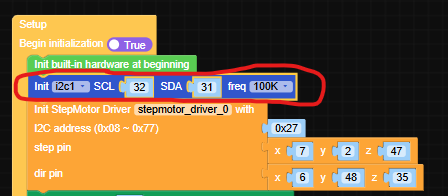
The module works fine now.
-
@BR123456, @kuriko Hi BR123456, kuriko,
we also tried your fix - unfortunately it did yet not work for my projectWe have the following situation:
- M5Stack Tab 5 with UIflow 2.4.0
- We also have connected a Module13.2 Stepmotor Driver v1.1 on the Tab5
- The UIflow web version is 2.4.0 https://uiflow2.m5stack.com
We could not sort out how to connect to UIflow Web 2.3.8.
Our UIFlow test code:
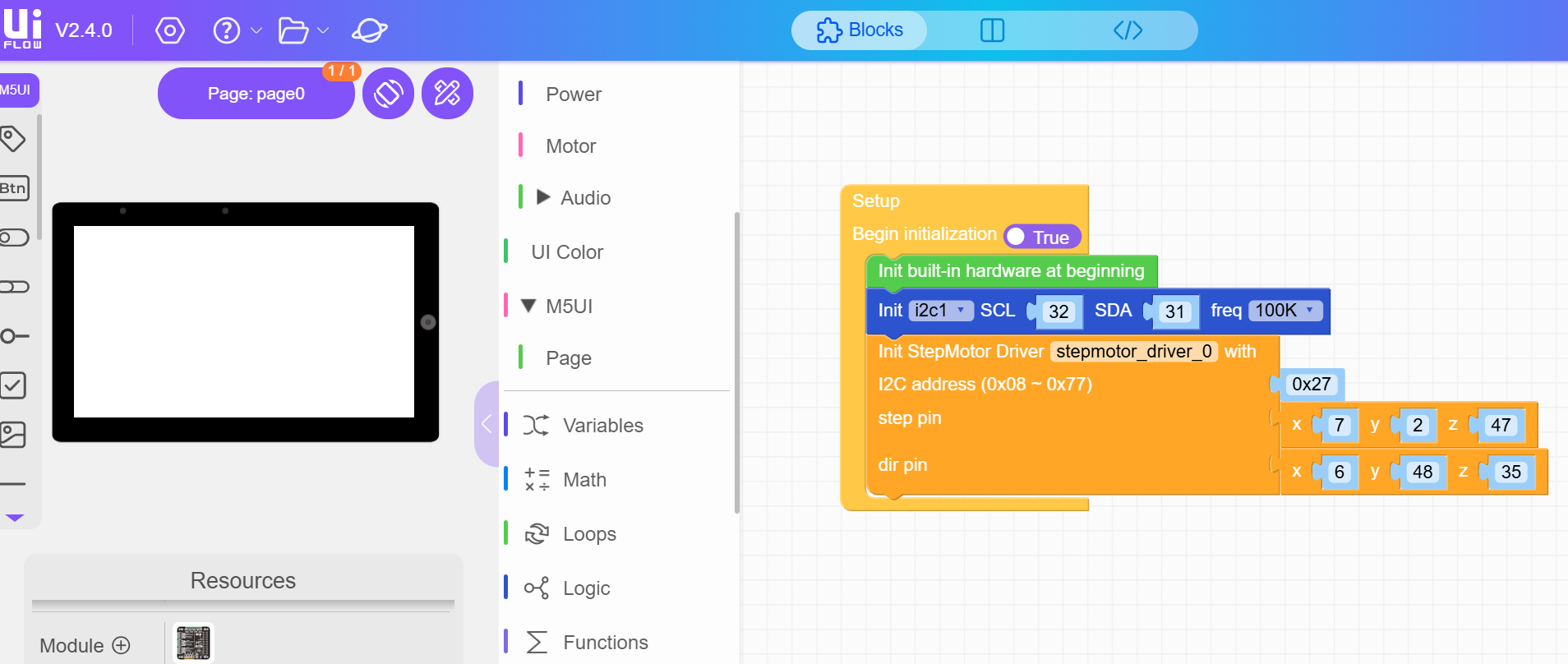
We also installed UIflow version 3.8.0 on the tab 5 but this did solve the problem.
Our error message looks like this:
Traceback (most recent call last):
  File "boot.py", line 46, in <module>
  File "m5sync/sync.py", line 521, in run
KeyboardInterrupt:
MicroPython v1.25.0-dirty on 2025-12-23; M5STACK Tab5 with ESP32P4
Type "help()" for more information.
>>> import gc
>>> gc.collect()
>>>
paste mode; Ctrl-C to cancel, Ctrl-D to finish
=== import os, sys, io
=== import M5
=== from M5 import *
=== import m5ui
=== import lvgl as lv
=== from hardware import Pin
=== from hardware import I2C
=== from module import StepMotorDriverModule
=== page0 = None
=== i2c1 = None
=== stepmotor_driver_0 = None
=== def setup():
===   global page0, i2c1, stepmotor_driver_0
===   M5.begin()
===   Widgets.setRotation(3)
===   m5ui.init()
===   page0 = m5ui.M5Page(bg_c=0xffffff)
===   i2c1 = I2C(1, scl=Pin(32), sda=Pin(31), freq=100000)
===   stepmotor_driver_0 = StepMotorDriverModule(address=0x27, step_pin=(7, 2, 47), dir_pin=(6, 48, 35))
=== def loop():
===   global page0, i2c1, stepmotor_driver_0
===   M5.update()
=== if __name__ == '__main__':
===   try:
===     setup()
===     while True:
===       loop()
===   except (Exception, KeyboardInterrupt) as e:
===     try:
===       m5ui.deinit()
===       from utility import print_error_msg
===       print_error_msg(e)
===     except ImportError:
===       print("please update to latest firmware")
===
===
===
E (14740) i2c.master: this port has not been initialized, please initialize it first
Could you give us a hint how we can solve our problem and let turn the motors.
Thanks for your support

Hello! It looks like you're interested in this conversation, but you don't have an account yet.
Getting fed up of having to scroll through the same posts each visit? When you register for an account, you'll always come back to exactly where you were before, and choose to be notified of new replies (either via email, or push notification). You'll also be able to save bookmarks and upvote posts to show your appreciation to other community members.
With your input, this post could be even better 💗
Register Login