Pb.HUB will not connect. [Fixed]
-
Here is a copy of the Python,,Terminal, and Blocks. I erased and burned the firmware again. I looked and didn't see anything that was similar for trouble shooting. The miniscule amount of code I kind of understand, I don't see anything that stands out. Any help would be appreciated.
---PYTHON---
from m5stack import *
from m5stack_ui import *
from uiflow import *
import unitscreen = M5Screen()
screen.clean_screen()
screen.set_screen_bg_color(0xFFFFFF)
pbhub_0 = unit.get(unit.PBHUB, unit.PORTA)label0 = M5Label('label0', x=102, y=101, color=0x000, font=FONT_MONT_38, parent=None)
pbhub_0.init_i2c_address(0x61)
while True:
label0.set_text(str(pbhub_0.read_status(0xFE)))
wait_ms(2)---From Terminal---
Connected to Serial Port!
ets Jul 29 2019 12:21:46rst:0x1 (POWERON_RESET),boot:0x17 (SPI_FAST_FLASH_BOOT)
configsip: 0, SPIWP:0xee
clk_drv:0x00,q_drv:0x00,d_drv:0x00,cs0_drv:0x00,hd_drv:0x00,wp_drv:0x00
mode:DIO, clock div:1
load:0x3fff0018,len:4
load:0x3fff001c,len:5228
load:0x40078000,len:13424
load:0x40080400,len:3568
entry 0x4008063c_ __ __ ()/ | | _____ __
| | | | | || |/ _ \ \ /\ / /
| || | | | | () \ V V /
_,||| ||___/ _/_/gc.collect()
paste mode; Ctrl-C to cancel, Ctrl-D to finish
=== from m5stack import *
=== from m5stack_ui import *
=== from uiflow import *
=== import unit
=== screen = M5Screen()
=== screen.clean_screen()
=== screen.set_screen_bg_color(0xFFFFFF)
=== pbhub_0 = unit.get(unit.PBHUB, unit.PORTA)
=== label0 = M5Label('label0', x=102, y=101, color=0x000, font=FONT_MONT_38, parent=None)
=== pbhub_0.init_i2c_address(0x61)
=== while True:
=== label0.set_text(str(pbhub_0.read_status(0xFE)))
=== wait_ms(2)Traceback (most recent call last):
File "<stdin>", line 8, in <module>
File "unit.py", line 190, in get
File "<string>", line 1, in <module>
File "units/_pbhub.py", line 15, in init
File "units/_pbhub.py", line 21, in _available
Unit: Pb.hub unit maybe not connect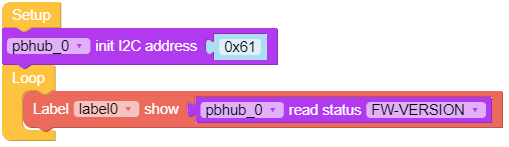
-
@isoeek Update! I did nothing new or different, now it works. I guess this is "normal" as no one replied.
-
@isoeek said in Pb.HUB will not connect.:
@isoeek Update! I did nothing new or different, now it works. I guess this is "normal" as no one replied.
More of a case that there was no one around yesterday.
Is it the Mega328 Pb.Hub you have?Which UIFlow are you using as I have one on my bench waiting to start a guide.
-
@ajb2k3 Oh, okay. I'm using the STM32 F030 and Uiflow V1. I'm using the Tough Core as well. What dosen't make sense is I had it working with blocks/code, then it stopped working. I tried different cables and ports with no joy. I even checked to make sure everything was plugged in. 😂.
-
@isoeek Okay, I think I'm the cause of the fault as it's not working now. All I'm trying to do is run 2 maybe 3 mosfet dc speed controllers with a PWM signal from the Pb.HUB. If its not capable I'll use the EXT.IO2.
-
Ahh power draw issues.
Try providing separate power to the devices but only connect the signal and GND pins to the PbHub.
-
@ajb2k3 I have a few Type C 2 Grove. I cant believe I didnt think about that. Thank you. I'll let you know how it goes.
-
@ajb2k3 Still no joy. 🤔This is from the terminal.
ets Jun 8 2016 00:22:57
rst:0x1 (POWERON_RESET),boot:0x13 (SPI_FAST_FLASH_BOOT)
configsip: 188777542, SPIWP:0xee
clk_drv:0x00,q_drv:0x00,d_drv:0x00,cs0_drv:0x00,hd_drv:0x00,wp_drv:0x00
mode:DIO, clock div:1
load:0x3fff0018,len:4
load:0x3fff001c,len:5228
load:0x40078000,len:12908
ho 0 tail 12 room 4
load:0x40080400,len:3512
entry 0x4008063c_ __ __ ()/ | | _____ __
| | | | | || |/ _ \ \ /\ / /
| || | | | | () \ V V /
_,||| ||___/ _/_/APIKEY: A2DCA138
Traceback (most recent call last):
File "flow/m5cloud.py", line 82, in _exec_fun
File "<string>", line 9, in <module>
File "unit.py", line 186, in get
File "<string>", line 1, in <module>
File "units/_pbhub.py", line 15, in init
File "units/_pbhub.py", line 21, in _available
Unit: Pb.hub unit maybe not connect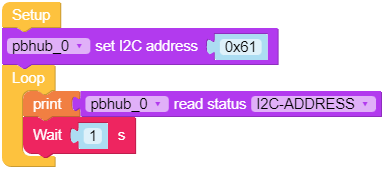
-
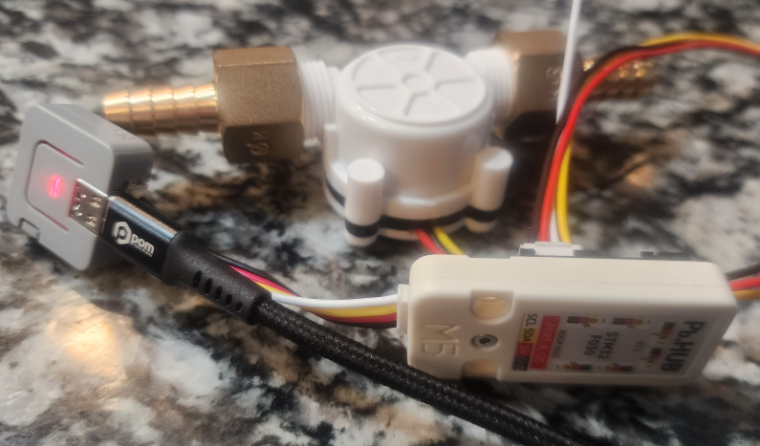
I can't connect PbHUB V1.1 to Atom Lite or Tough.
-
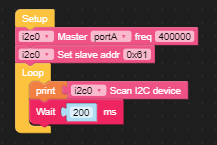
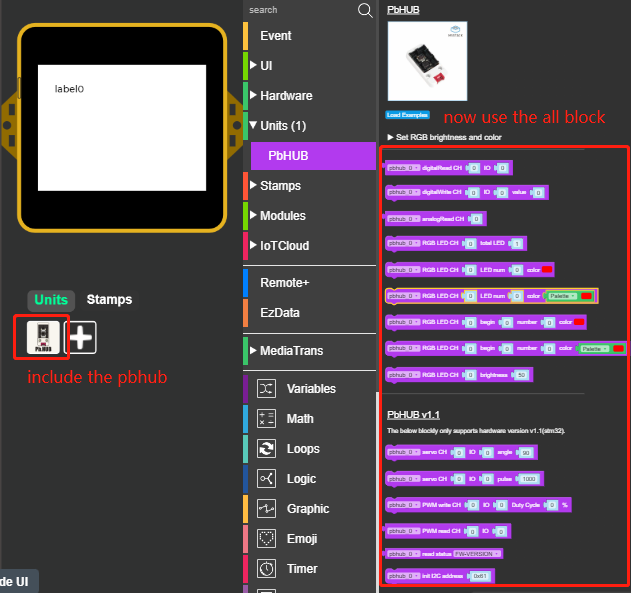
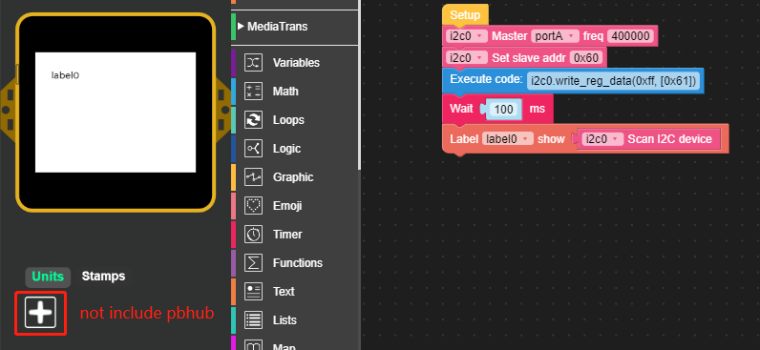
First check if pbhub is connected or not? Check whether the i2c scan device result is [0x61] or [97]. -
@pandian-nano Thanks for the suggestion and help. This is what is in the terminal.
=== from m5stack import *
=== from m5stack_ui import *
=== from uiflow import *
=== import i2c_bus
=== import time
=== import unit
=== screen = M5Screen()
=== screen.clean_screen()
=== screen.set_screen_bg_color(0xFFFFFF)
=== pbhub_0 = unit.get(unit.PBHUB, unit.PORTA)
=== i2c0 = i2c_bus.easyI2C(i2c_bus.PORTA, 0x00, freq=400000)
=== i2c0.addr=(0x68)
=== while True:
=== print(i2c0.scan())
=== wait_ms(200)
=== wait_ms(2)Traceback (most recent call last):
File "<stdin>", line 10, in <module>
File "unit.py", line 190, in get
File "<string>", line 1, in <module>
File "units/_pbhub.py", line 15, in init
File "units/_pbhub.py", line 21, in _available
Unit: Pb.hub unit maybe not connect -
I have lost track of how many times ive erased and downloaded the firmware. This is the last Terminal screen.
Connected to Serial Port!
( �m�!0ϟ��( �m�!0���
_ __ _
_ ()/ | | _____ __
| | | | | || |/ _ \ \ /\ / /
| || | | | | () \ V V /
_,||| ||___/ _/_/APIKEY: 2F9D3FE8
Traceback (most recent call last):
File "main.py", line 12, in <module>
File "unit.py", line 190, in get
File "<string>", line 1, in <module>
File "units/_pbhub.py", line 15, in init
File "units/_pbhub.py", line 21, in _available
Unit: Pb.hub unit maybe not connect
MicroPython b0cb55176-dirty on 2023-08-03; M5Stack with ESP32
Type "help()" for more information.I felt I was making decent progress at first. I have had so many failures now, I question the little bit I do know. Tried Uiflow V2 but Pb.Hub is not available.
-
Hi,
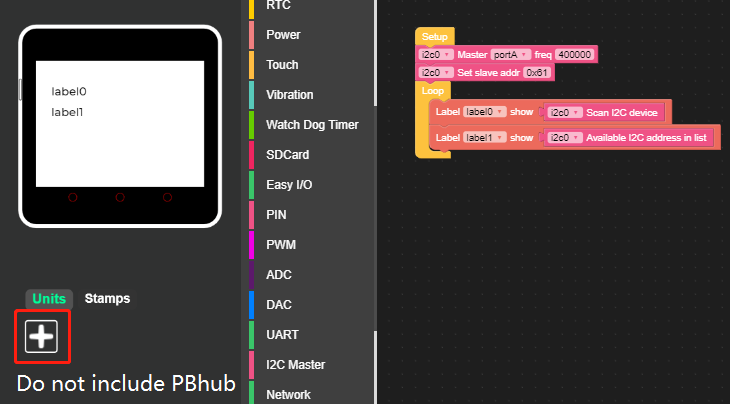
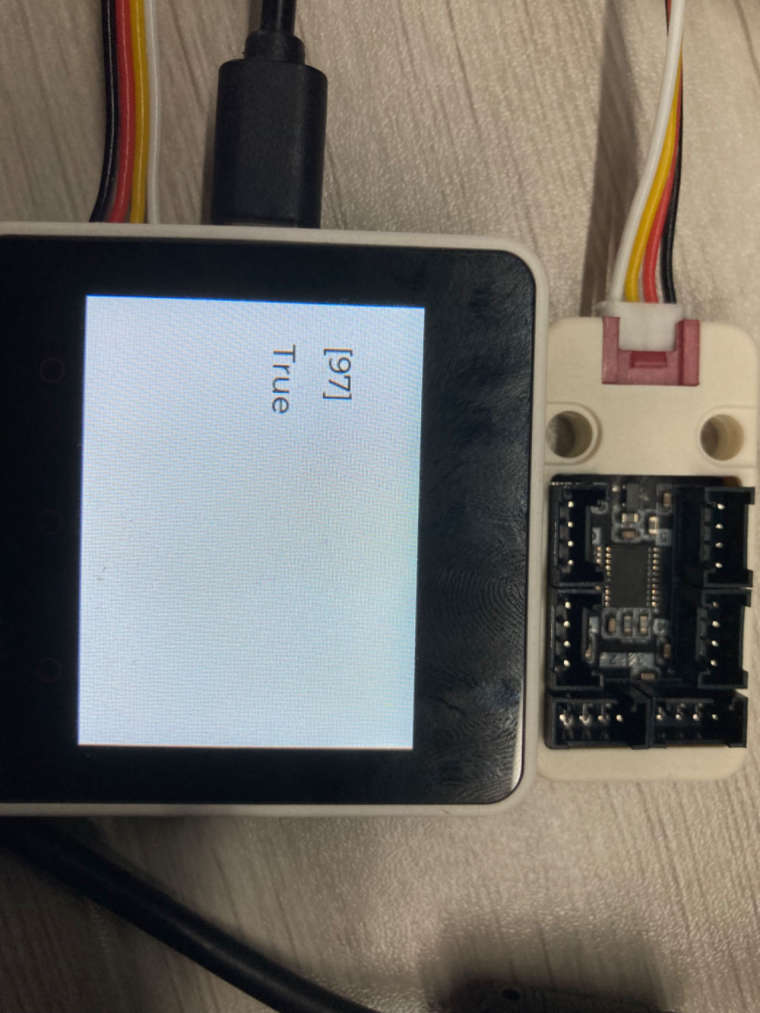
Please check again and check the result
-
@pandian-nano Thanks. This is the out come. I looked up the Hex for 96 and I get 0x60. I believe I need to set init and/or set the new address. Is the answer as simple as using the Write Memory Data under I2C Master? Is the included block what I need to burn? I'm doing my best to learn this, but damn there is a lot to learn!
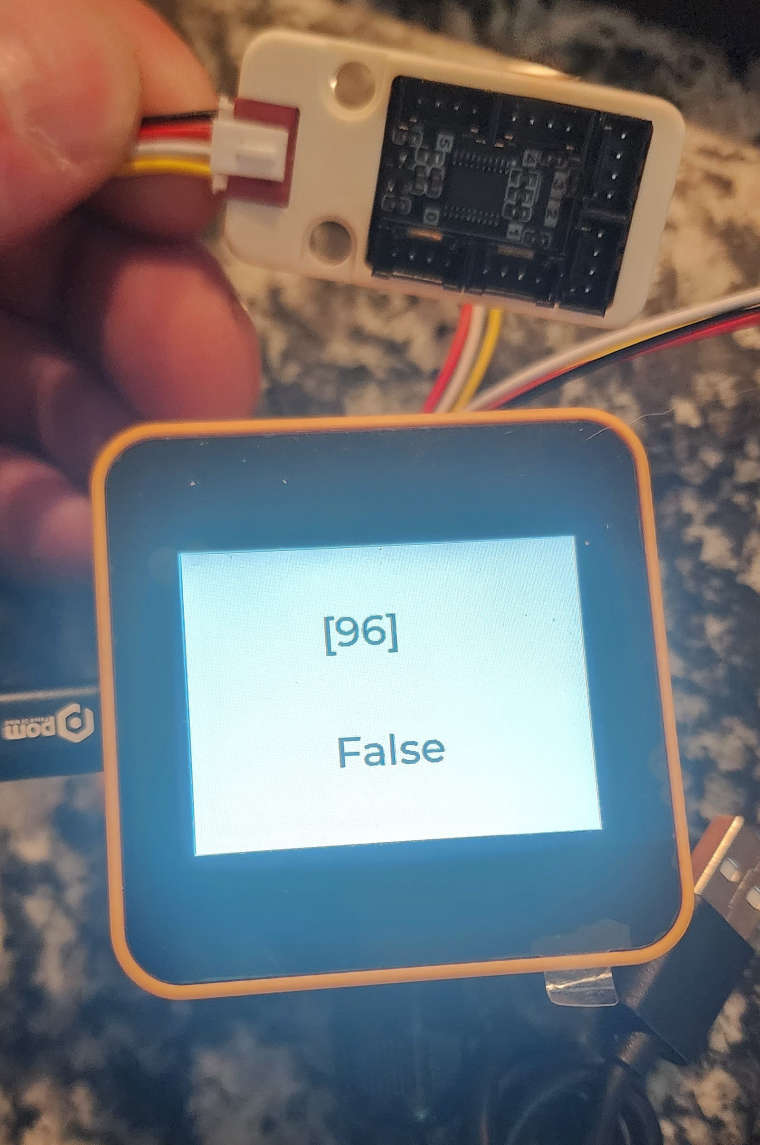
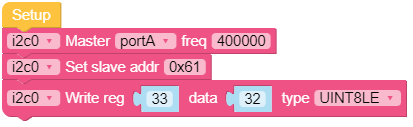
I tried using this code and I had no change. -
-
Please check again and check the result 0x61[97]
-
If you get 0x61 result then your pbhub i2c address was changed from 0x60 to 0x61
-
-
@pandian-nano said in Pb.HUB will not connect.:
97
I now get [97] and True. I just tried using digital and analog read. Both are working as expected. That was a really cool party trick! Where can I read more about what you walked me through. I obviously have no issues making bad code. I need to know how to clean up my own messes and how to debug. Thank you so much for the help. I appreciate it more than you know.
-
-
@pandian-nano Thank you. I have read through that several times and it makes no more sense than the time before. I'll eventually come across something that I understand and it will sink in. Thanks again.

Hello! It looks like you're interested in this conversation, but you don't have an account yet.
Getting fed up of having to scroll through the same posts each visit? When you register for an account, you'll always come back to exactly where you were before, and choose to be notified of new replies (either via email, or push notification). You'll also be able to save bookmarks and upvote posts to show your appreciation to other community members.
With your input, this post could be even better 💗
Register Login