🤖Have you ever tried Chat.M5Stack.com before asking??😎
  • Where is TimerPWR Unit Library?

    3
    0 Votes
    3 Posts
    1k Views
    N
    @kuriko Thank you!
  • Unit cam S3 : .ino files , where to find

    4
    0 Votes
    4 Posts
    3k Views
    C
    @HappyUser it is not impossible to port the source code from PlatformIO to Arduino or vice versa. Here is someone who made a script for it. Maybe the script does not work right out of the box but it could give you some hints or insight about what is needed to port the source code. As I understand it the two platforms are very similar but their build/make process and their library management are a bit different.
  • M5 Unit Scroll Arduino Example

    9
    0 Votes
    9 Posts
    6k Views
    C
    EUREKA!!!! With this setup it works Wire.begin(26, 32); // (sda, sck) M5.begin(true, false, true); Serial.begin(115200);
  • JoyC missing documentation

    2
    0 Votes
    2 Posts
    2k Views
    kurikoK
    @sirtet I think there is a switch pin in addition to SDA and SCL (the joystick is pressed or not) The battery can power the Stick, and StickC and StickCPlus can read the battery voltage, but StickCPlus2 cannot I personally adopt that the switch could just powering the LEDs...or STM32 on JoyC?
  • Current or Power Consumption of the M5Stack I2C Weight Unit

    1
    0 Votes
    1 Posts
    1k Views
    No one has replied
  • ISO485 is provided terminal is GND or Shield?

    1
    0 Votes
    1 Posts
    922 Views
    No one has replied
  • Unit cam S3 unsafe poster

    4
    0 Votes
    4 Posts
    2k Views
    J
    @ajb2k3 i'm still rewiring the firmware above to use AWS s3, but will be good if the documentation can provide some example about that. https://github.com/m5stack/UnitCamS3-UserDemo/tree/unitcams3-5mp/platforms/unitcam_s3_5mp/main/hal_unitcam_s3_5mp/servers/apis More detail about that process can make the unit more noob friendly like ESP-CAM and another projects
  • M5StickPlus2 - esp_core_dump_flash: Core dump flash config is corrupted!

    2
    0 Votes
    2 Posts
    2k Views
    kurikoK
    @G00TH I have never encountered this problem, and I don't see any place in M5StickCPlus2.h that may cause this problem. Maybe it is related to Flash Mode? If possible, can you provide your code?
  • M5Stack MiniScale - can it work with Python using I2C?

    2
    0 Votes
    2 Posts
    2k Views
    A
    Hi @xpackers, i can help you with the micropython code for the miniScale unit. regarding the accuracy of the unit i have the same problem, its drifts a lot over time with or without calibration, i try to use the set_offset() function before each use but its useless over time. tried to take it a part and tighten the screws a little but also the same problem this is the miniUnit.py from machine import I2C, Pin import time import struct Constants DEVICE_DEFAULT_ADDR = 0x26 Scale Registers UNIT_SCALES_RAW_ADC_REG = 0x00 UNIT_SCALES_CAL_DATA_REG = 0x10 UNIT_SCALES_BUTTON_REG = 0x20 UNIT_SCALES_RGB_LED_REG = 0x30 UNIT_SCALES_SET_GAP_REG = 0x40 UNIT_SCALES_SET_OFFSET_REG = 0x50 UNIT_SCALES_CAL_DATA_INT_REG = 0x60 UNIT_SCALES_CAL_DATA_STRING_REG = 0x70 UNIT_SCALES_FILTER_REG = 0x80 JUMP_TO_BOOTLOADER_REG = 0xFD FIRMWARE_VERSION_REG = 0xFE I2C_ADDRESS_REG = 0xFF class UnitScales: def init(self, sda=21, scl=22, addr=DEVICE_DEFAULT_ADDR): self._i2c = I2C(0, scl=Pin(scl), sda=Pin(sda), freq=400000) self._addr = addr def write_bytes(self, reg, data): self._i2c.writeto(self._addr, bytes([reg]) + data) def read_bytes(self, reg, length): self._i2c.writeto(self._addr, bytes([reg])) return self._i2c.readfrom(self._addr, length) def begin(self): try: self._i2c.readfrom(self._addr, 1) return True except OSError: return False def get_btn_status(self): data = self.read_bytes(UNIT_SCALES_BUTTON_REG, 1) return data[0] def set_led_color(self, color_hex): color = bytearray(3) color[0] = (color_hex >> 16) & 0xff # RED color[1] = (color_hex >> 8) & 0xff # GREEN color[2] = color_hex & 0xff # BLUE self.write_bytes(UNIT_SCALES_RGB_LED_REG, color) def get_led_color(self): color = self.read_bytes(UNIT_SCALES_RGB_LED_REG, 3) return (color[0] << 16) | (color[1] << 8) | color[2] def get_weight(self): data = self.read_bytes(UNIT_SCALES_CAL_DATA_REG, 4) return struct.unpack('<f', data)[0] def get_weight_int(self): data = self.read_bytes(UNIT_SCALES_CAL_DATA_INT_REG, 4) return int.from_bytes(data, 'little') def get_weight_string(self): data = self.read_bytes(UNIT_SCALES_CAL_DATA_STRING_REG, 16) return ''.join([chr(b) for b in data if b != 0]) def get_gap_value(self): data = self.read_bytes(UNIT_SCALES_SET_GAP_REG, 4) return struct.unpack('<f', data)[0] def set_gap_value(self, offset): data = struct.pack('<f', offset) self.write_bytes(UNIT_SCALES_SET_GAP_REG, data) def set_offset(self): self.write_bytes(UNIT_SCALES_SET_OFFSET_REG, bytearray([1])) def get_raw_adc(self): data = self.read_bytes(UNIT_SCALES_RAW_ADC_REG, 4) return int.from_bytes(data, 'little') def set_i2c_address(self, addr): self.write_bytes(I2C_ADDRESS_REG, bytearray([addr])) self._addr = addr return self._addr def get_i2c_address(self): data = self.read_bytes(I2C_ADDRESS_REG, 1) return data[0] def get_firmware_version(self): data = self.read_bytes(FIRMWARE_VERSION_REG, 1) return data[0] def jump_bootloader(self): self.write_bytes(JUMP_TO_BOOTLOADER_REG, bytearray([1]))

  • Change NCIR 2 from C to F

    4
    0 Votes
    4 Posts
    2k Views
    felmueF
    Hello @reptilepvp just try something like below: label2.setText(str(((ncir2_0.get_temperature_value) * 9) / 5 + 32)) Note: untested as I do not have the necessary hardware to verify. Thanks Felix
  • Core2 Arduino samples do not work

    2
    0 Votes
    2 Posts
    2k Views
    felmueF
    Hello @G00TH I think the issue is with M5Core2 library not being ready/compatible for Arduino library version 3.x.x. (I get the same compilation errors as you are reporting.) That said, you could downgrade Arduino library to version 2.x.x - then the Hello World example of the M5Core2 library works for me. Or I suggest you try M5Unified with M5GFX libraries instead. For me they compile and run fine with Arduino library 2.x.x or 3.x.x. #include <M5Unified.h> #include <M5GFX.h> void setup() { auto cfg = M5.config(); M5.begin(cfg); M5.Display.println("M5Core2 - Hello world"); } void loop() { } Thanks Felix
  • Using the MIDI Unit with Core2

    1
    1 Votes
    1 Posts
    1k Views
    No one has replied
  • M5Unit_CO2_Core2 example compilation error

    2
    0 Votes
    2 Posts
    2k Views
    F
    @GordonD said in M5Unit_CO2_Core2 example compilation error: fatal error: bsec2.h: No such file or directory https://github.com/BoschSensortec/Bosch-BSEC2-Library
  • PA.HUB2 Unit - documentation

    6
    0 Votes
    6 Posts
    5k Views
    felmueF
    Hello @tonyd I am glad to hear you got it working. Sorry, no, I don't know what the scroll method does. Thanks Felix
  • Pinout For UnitCamS3 - 5MP

    5
    1 Votes
    5 Posts
    3k Views
    J
    @geanner I am looking for this info too. They are discussing it here on github. https://github.com/m5stack/UnitCamS3-UserDemo/issues/11 I don't even see py260 listed in sensor.h https://github.com/espressif/esp32-camera/blob/master/driver/include/sensor.h
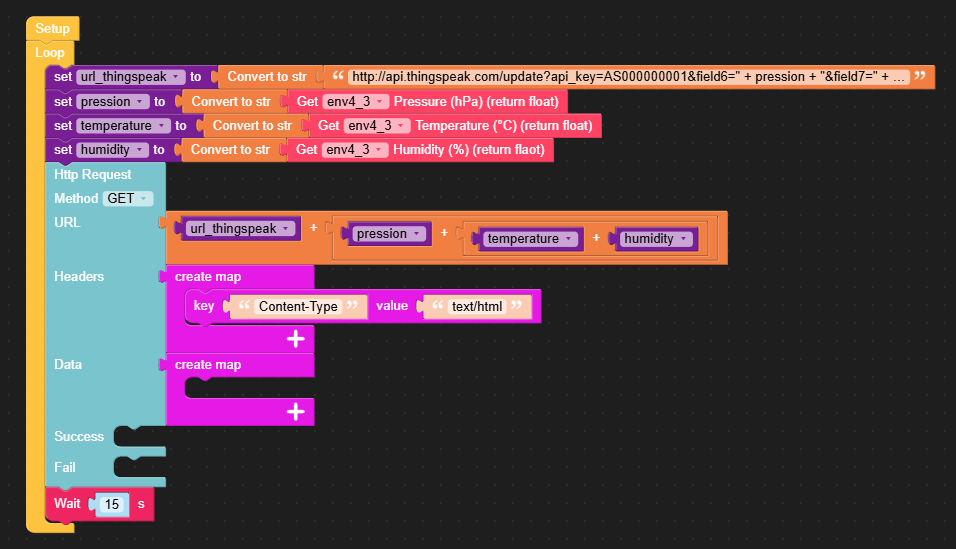
  • Thingspeak API - multiple fields

    3
    1
    0 Votes
    3 Posts
    2k Views
    M
    Hello @felmue Thanks for your help. Everything works with this solution :-) : [image: 1727730377725-2024-09-30-23-04-21.png]
  • TVOC/eCO2 accuracy

    3
    0 Votes
    3 Posts
    2k Views
    ajb2k3A
    @greenleaf Can you set up some kind or record to show the reading from both over a long time? I haven't done a long term test so I'm curious. If you can map the deviation between the two then you should be able to tune the sensor. Also some thing else to check is if they are reading at the same resolution.
  • Pb.Hub and RGB Unit

    16
    0 Votes
    16 Posts
    14k Views
    W
    I also encountered this problem and looked into it. When I looked at M5Stack's GitHUB repository, I noticed that the F/W version was 2. My item was 1 https://github.com/m5stack/M5-PbHUB-Internal-FW After rewriting the F/W, multiple LEDs can now be controlled normally. It seems there was a problem with the initial F/W. https://x.com/washishi/status/1840095657954291775 To rewrite, you will need a tool (ST-LINK) that can write to STM32.
  • RF433R demodulation

    2
    0 Votes
    2 Posts
    2k Views
    J
    CORRECTION: The code I was able to get working was from https://github.com/aat440hz/RF433-SignalTest-M5StickCPlus2/blob/main/RF433-SignalTest-M5StickCPlus2.ino , which displays the signal on the M5Stick. I've since tried using the example from the M5Stack repo ( https://github.com/m5stack/M5Stack/blob/master/examples/Unit/RF433/RF433.ino ) have flashed the images to M5Core devices (one with '#define RF433RX' and one without, as per the instructions) but pressing the buttons doesn't do anything, and I'm not seeing anything displayed on serial for either device either. I know both units work because I can flash firmware on other M5Stack modules (like the M5StickCPlus2) and send and receive RF. Does the example on GitHub just not work? Short video showing sending unit doing nothing with button presses: https://imgur.com/a/mcsAZFT
  • Unit CamS3 Wi-Fi Camera 5MP store images on cloud

    1
    0 Votes
    1 Posts
    1k Views
    No one has replied