🤖Have you ever tried Chat.M5Stack.com before asking??😎
    M5Stack Community
    • Categories
    • Recent
    • Tags
    • Popular
    • Users
    • Groups
    • Search
    • Register
    • Login

    How to use two ENV units with PaHUB (UIFlow)

    Scheduled Pinned Locked Moved Units
    12 Posts 5 Posters 23.1k Views 1 Watching
    Loading More Posts
    • Oldest to Newest
    • Newest to Oldest
    • Most Votes
    Reply
    • Reply as topic
    Log in to reply
    This topic has been deleted. Only users with topic management privileges can see it.
    • lukasmaximusL Offline
      lukasmaximus
      last edited by

      Glad the video helped ;)

      1 Reply Last reply Reply Quote 0
      • G Offline
        GrafoLabs @liemph
        last edited by

        @liemph Could you share the link to the video, please?

        P 1 Reply Last reply Reply Quote 0
        • P Offline
          Pepsi @GrafoLabs
          last edited by

          @grafolabs
          I think this is the video
          https://youtu.be/nMsCwqCE5c8

          It is clear in explaining the PaHUB with UIFlow

          1 Reply Last reply Reply Quote 0
          • J Offline
            jollawat
            last edited by

            Hi Guys
            I have some further question, what about M5Stick C + ENV HAT + PbHUB connect together?

            liemphL 1 Reply Last reply Reply Quote 0
            • liemphL Offline
              liemph @jollawat
              last edited by

              @jollawat There is no problem. The pins used for the Hat (ENV HAT) and the ones used for the grove port (PbHUB) are different.

              J 1 Reply Last reply Reply Quote 0
              • J Offline
                jollawat @liemph
                last edited by

                @liemph I tried connect and program by UIFlow it but there are some error after run on screen said “please remove ENV hat” when we add PbHUB into list.

                liemphL 2 Replies Last reply Reply Quote 0
                • liemphL Offline
                  liemph @jollawat
                  last edited by

                  @jollawat I did not get it. Please post also your configuration (the connection between Stick-C, Hat and Unit) and your code.

                  1 Reply Last reply Reply Quote 0
                  • liemphL Offline
                    liemph @jollawat
                    last edited by

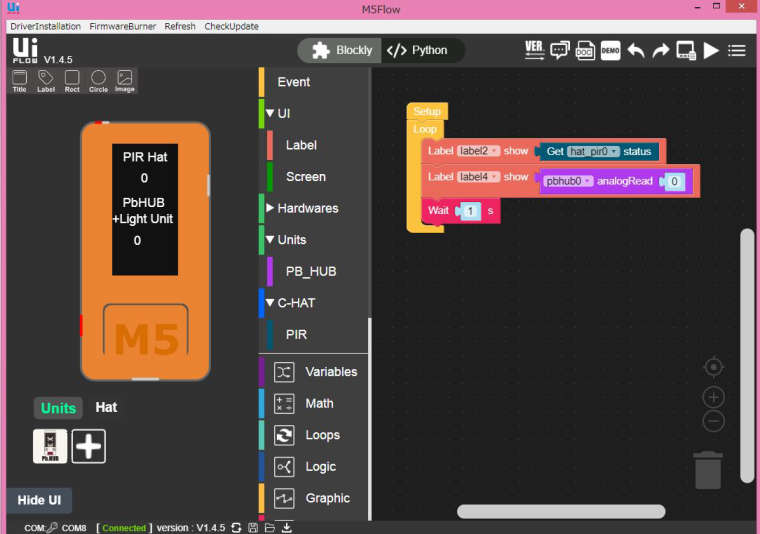
                    @jollawat I do not have any ENV Hat, but I have a PIR Hat, and I tried to reconstruct your problem. I connected my PIR Hat and my PbHub (to Port A) of my Stick C. Then I connected my Light Unit to Port0 of my PbHub. Then I programmed using UiFlow to show the measurement results of both the PIR Hat and Light Unit. It worked well. Please see below, the code snapshot and list.

                    1 Reply Last reply Reply Quote 0
                    • liemphL Offline
                      liemph
                      last edited by

                      0_1587218398396_problem.JPG

                      1 Reply Last reply Reply Quote 0
                      • liemphL Offline
                        liemph
                        last edited by

                        from m5stack import *
                        from m5ui import *
                        from uiflow import *
                        import hat
                        import unit
                        import hat
                        
                        setScreenColor(0x111111)
                        pbhub0 = unit.get(unit.PBHUB, unit.PORTA)
                        
                        hat_pir0 = hat.get(hat.PIR)


                        label0 = M5TextBox(13, 8, "PIR Hat", lcd.FONT_Default,0xFFFFFF, rotate=0)
                        label1 = M5TextBox(12, 63, "PbHUB", lcd.FONT_Default,0xFFFFFF, rotate=0)
                        label2 = M5TextBox(34, 34, "0", lcd.FONT_Default,0xFFFFFF, rotate=0)
                        label3 = M5TextBox(0, 83, "+Light Unit", lcd.FONT_Default,0xFFFFFF, rotate=0)
                        label4 = M5TextBox(26, 109, "0", lcd.FONT_Default,0xFFFFFF, rotate=0)
                        
                        
                        while True:
                          label2.setText(str(hat_pir0.state))
                          label4.setText(str(pbhub0.analogRead(0)))
                          wait(1)
                          wait_ms(2)

                        
                        1 Reply Last reply Reply Quote 0

                        Hello! It looks like you're interested in this conversation, but you don't have an account yet.

                        Getting fed up of having to scroll through the same posts each visit? When you register for an account, you'll always come back to exactly where you were before, and choose to be notified of new replies (either via email, or push notification). You'll also be able to save bookmarks and upvote posts to show your appreciation to other community members.

                        With your input, this post could be even better 💗

                        Register Login
                        • First post
                          Last post