🤖Have you ever tried Chat.M5Stack.com before asking??😎
    M5Stack Community
    • Categories
    • Recent
    • Tags
    • Popular
    • Users
    • Groups
    • Search
    • Register
    • Login

    How to change the CoreMP135 boot logo image?

    Scheduled Pinned Locked Moved PRODUCTS
    10 Posts 3 Posters 5.2k Views
    Loading More Posts
    • Oldest to Newest
    • Newest to Oldest
    • Most Votes
    Reply
    • Reply as topic
    Log in to reply
    This topic has been deleted. Only users with topic management privileges can see it.
    • A Offline
      aitech
      last edited by

      I see in the FAQ's there is an answer to this...

      "There are three ways to solve your problem. First, in the uboot stage, remove "show_logo" from bootcmd. The second method is to create a 320*240 rgb565 bmp image and place it in /boot/logo_lcd_320_240_rgb565.bmp, which will be displayed when the system boots up. Third, modify the source code at https://github.com/m5stack/CoreMP135_buildroot-external-st/blob/st/2023.02.10/board/m5stack/coremp135_5_15/patches/uboot/0001-cmd_show_logo.patch, and recompile an image that belongs to you."

      I have created the bmp file, but not sure where to put it on my MP135 (debian). I can locate the boot directory which has three files in it, but none of them are logo_lcd_320_240_rgb565.bmp which I was expecting to see. So where does it go?

      J

      kurikoK 1 Reply Last reply Reply Quote 0
      • kurikoK Offline
        kuriko @aitech
        last edited by

        @aitech
        you just put the logo_lcd_320_240_rgb565.bmp into /boot/

        Good morning, and welcome to the Black Mesa Transit System.

        A 1 Reply Last reply Reply Quote 0
        • A Offline
          aitech @kuriko
          last edited by

          @kuriko

          I have tried that but it still comes up with the MP135 logo ?

          Screenshot 2024-12-02 at 15.54.34.png

          I can view the bmp file ok on another machine

          ajb2k3A 1 Reply Last reply Reply Quote 0
          • ajb2k3A Offline
            ajb2k3 @aitech
            last edited by ajb2k3

            @aitech doesn’t work but I have replaced the second boot screen, yes there are 2 boot screens. The primary boot screen is controlled by the DTB file and need recompiling, the second is in another location.
            The guide will be in my CoreMP135 Update document closer to Christmas from the FB groupe

            UIFlow, so easy an adult can learn it!
            If I don't know it, be patient!
            I've ether not learned it or am too drunk to remember it!
            Author of the WIP UIFlow Handbook!
            M5Black, Go, Stick, Core2, and so much more it cant be fit in here!

            kurikoK 1 Reply Last reply Reply Quote 0
            • kurikoK Offline
              kuriko @ajb2k3
              last edited by kuriko

              @ajb2k3
              i saw there is a .jpg file for the second boot logo... but for the first one i thought it will apply "0001-cmd_show_logo.patch" to the buildroot. but even if i change the pixels in that .patch
              and recompile it still nothing changed... i'm confused

              Good morning, and welcome to the Black Mesa Transit System.

              ajb2k3A 1 Reply Last reply Reply Quote 0
              • ajb2k3A Offline
                ajb2k3 @kuriko
                last edited by

                @kuriko No, do not touch the patch file.

                UIFlow, so easy an adult can learn it!
                If I don't know it, be patient!
                I've ether not learned it or am too drunk to remember it!
                Author of the WIP UIFlow Handbook!
                M5Black, Go, Stick, Core2, and so much more it cant be fit in here!

                kurikoK 1 Reply Last reply Reply Quote 0
                • kurikoK Offline
                  kuriko @ajb2k3
                  last edited by kuriko

                  @ajb2k3
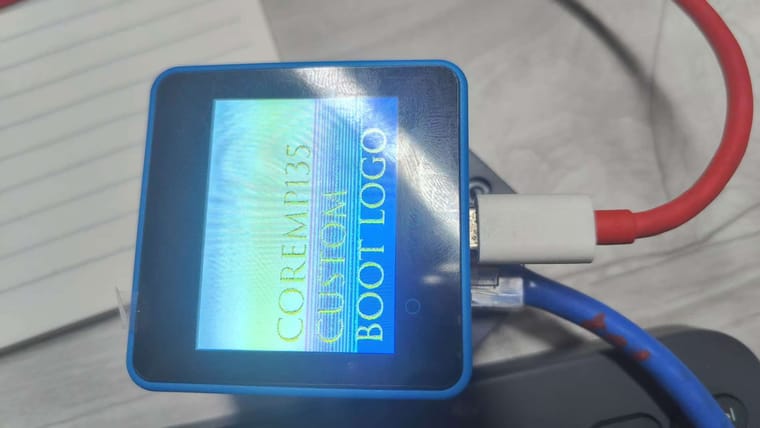
                  okay... after few hours of digging, I found it out that you must save the .bmp file as 16bit-depth (RGB565), mspaint does not have that feature so i got it worked by using Photoshop
                  WechatIMG130.jpg

                  Good morning, and welcome to the Black Mesa Transit System.

                  ajb2k3A 1 Reply Last reply Reply Quote 1
                  • ajb2k3A Offline
                    ajb2k3 @kuriko
                    last edited by

                    @kuriko It might sound dump now but the filename does say that it needs to have this colour profile.

                    UIFlow, so easy an adult can learn it!
                    If I don't know it, be patient!
                    I've ether not learned it or am too drunk to remember it!
                    Author of the WIP UIFlow Handbook!
                    M5Black, Go, Stick, Core2, and so much more it cant be fit in here!

                    kurikoK 1 Reply Last reply Reply Quote 0
                    • kurikoK Offline
                      kuriko @ajb2k3
                      last edited by

                      @ajb2k3
                      I mean... I don’t quite understand what 16-bit means. I used to save it directly in MSPaint as 16-bit color. I thought this was the same as 16-bit depth... Finally, I tried many methods and found that I had to use Adobe Photoshop.

                      Good morning, and welcome to the Black Mesa Transit System.

                      ajb2k3A 1 Reply Last reply Reply Quote 0
                      • ajb2k3A Offline
                        ajb2k3 @kuriko
                        last edited by

                        @kuriko I’ve started writing a guide for it using the gimp image editor and the sample will be online nr Christmas (I hope)


                        UIFlow, so easy an adult can learn it!
                        If I don't know it, be patient!
                        I've ether not learned it or am too drunk to remember it!
                        Author of the WIP UIFlow Handbook!
                        M5Black, Go, Stick, Core2, and so much more it cant be fit in here!

                        1 Reply Last reply Reply Quote 1

                        Hello! It looks like you're interested in this conversation, but you don't have an account yet.

                        Getting fed up of having to scroll through the same posts each visit? When you register for an account, you'll always come back to exactly where you were before, and choose to be notified of new replies (either via email, or push notification). You'll also be able to save bookmarks and upvote posts to show your appreciation to other community members.

                        With your input, this post could be even better 💗

                        Register Login
                        • First post
                          Last post