🤖Have you ever tried Chat.M5Stack.com before asking??😎
    M5Stack Community
    • Categories
    • Recent
    • Tags
    • Popular
    • Users
    • Groups
    • Search
    • Register
    • Login

    multiple i2c bugs

    Scheduled Pinned Locked Moved UiFlow 2.0
    10 Posts 4 Posters 12.2k Views
    Loading More Posts
    • Oldest to Newest
    • Newest to Oldest
    • Most Votes
    Reply
    • Reply as topic
    Log in to reply
    This topic has been deleted. Only users with topic management privileges can see it.
    • H Offline
      HWTaro9
      last edited by

      I am trying to get the CoreS3's proximity and ambient light sensor to work in UiFlow2.0 and I am having these problems.
      1: i2c "Generate START condition" block shows this error "OSError: I2C operation not supported"
      2: i2c "Scan Device" block returns addresses, but the address for the LTR553 (0x23) does not show up.
      3: You need an object with buffer protocol to send data via i2c but something with buffer protocol (like bytearray) does not work.

      Any help or bug fix/update is much appreciated!

      1 Reply Last reply Reply Quote 0
      • felmueF Offline
        felmue
        last edited by

        Hello @HWTaro9

        1: not sure when this is actually needed.

        2: I2C scan returns a list with decimal values (not hex) therefore you should be looking for the decimal value 35 (=0x23) in the list.

        3: I am able to write to and read from the light sensor like below:
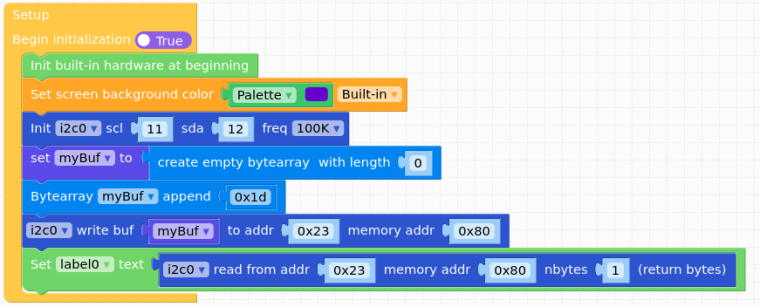
        0_1684787251587_UIFlow2_CoreS3_Lightsensor_20230522.png

        Thanks
        Felix

        GPIO translation table M5Stack / M5Core2
        Information about various M5Stack products.
        Code examples

        1 Reply Last reply Reply Quote 0
        • H Offline
          HWTaro9
          last edited by

          Thank you very much for the info and code! But the reason I need to send a start command is because the microphone decoder only sends code after a start condition is sent, and I'm not sure that it is sent automatically.

          1 Reply Last reply Reply Quote 0
          • felmueF Offline
            felmue
            last edited by

            Hello @HWTaro9

            it is my understanding that audio data from the microphones are being sent via I2S (not I2C), no?

            Do you have a document explaining the I2C commands of the ES7210?

            Thanks
            Felix

            GPIO translation table M5Stack / M5Core2
            Information about various M5Stack products.
            Code examples

            H 1 Reply Last reply Reply Quote 0
            • H Offline
              HWTaro9
              last edited by

              This post is deleted!
              1 Reply Last reply Reply Quote 0
              • H Offline
                HWTaro9 @felmue
                last edited by

                @felmue page 4 in this document http://www.everest-semi.com/pdf/ES7210 PB.pdf

                1 Reply Last reply Reply Quote 0
                • felmueF Offline
                  felmue
                  last edited by

                  Hello @HWTaro9

                  that is only the general description of how I2C works. Or am I missing something?

                  I am looking for a list of register addresses which can be read and write to.

                  Thanks
                  Felix

                  GPIO translation table M5Stack / M5Core2
                  Information about various M5Stack products.
                  Code examples

                  A 1 Reply Last reply Reply Quote 0
                  • A Offline
                    aleekwen @felmue
                    last edited by

                    @felmue this IDE code works for me on the CoreS3 - I had to cobble together code from various sources to get this to work (and still use the CoreS3 lib)

                    #define LTR553_ADDR 0x23

                    void writeRegister8(uint8_t _address, uint8_t subAddress, uint8_t data, uint32_t freq) {
                    Wire1.beginTransmission(_address);
                    Wire1.write(subAddress);
                    Wire1.write(data);
                    Wire1.endTransmission();
                    }

                    uint8_t readRegister8(uint8_t _address, uint8_t subAddress, uint32_t freq) {
                    Wire1.beginTransmission(_address);
                    Wire1.write(subAddress);
                    Wire1.endTransmission();
                    Wire1.requestFrom(_address, (size_t)1);
                    return Wire1.read();
                    }

                    void readRegister(uint8_t _address, uint8_t subAddress, uint8_t buff[], int size, uint32_t freq) {
                    Wire1.beginTransmission(_address);
                    Wire1.write(subAddress);
                    Wire1.endTransmission();
                    Wire1.requestFrom(_address, (size_t)size);
                    for (int i = 0; i < size; i++) {
                    buff[i] = Wire1.read();
                    }
                    }

                    bool LTR553Init() {
                    // soft reset
                    uint8_t value_r = readRegister8(LTR553_ADDR, 0x80, 100000L);
                    value_r &= (~0x02);
                    uint8_t value_w = value_r | 0x02;
                    writeRegister8(LTR553_ADDR, 0x80, value_w, 100000L);

                    // PS Led Pluse
                    writeRegister8(LTR553_ADDR, 0x83, 0x0F, 100000L);
                    // ALS Active Mode
                    value_r = readRegister8(LTR553_ADDR, 0x80, 100000L);
                    value_r &= (~0x01);
                    value_w = value_r | 0x01;
                    writeRegister8(LTR553_ADDR, 0x80, value_w, 100000L);
                    // PS Active Mode
                    value_r = readRegister8(LTR553_ADDR, 0x81, 100000L);
                    value_r &= (~0x03);
                    value_w = value_r | 0x03;
                    writeRegister8(LTR553_ADDR, 0x81, value_w, 100000L);
                    return true;
                    

                    }

                    uint32_t GetLTR553AlsCh0Value() {
                    uint8_t buffer[2];
                    uint32_t result;
                    readRegister(LTR553_ADDR, 0x8A, buffer, 2, 100000L);
                    result = (buffer[1] << 8) | buffer[0];
                    return result;
                    }

                    uint32_t GetLTR553AlsCh1Value() {
                    uint8_t buffer[2];
                    uint32_t result;
                    readRegister(LTR553_ADDR, 0x88, buffer, 2, 100000L);
                    result = (buffer[1] << 8) | buffer[0];
                    return result;
                    }

                    uint16_t GetLTR553PsValue() {
                    uint8_t buffer[2];
                    uint16_t result;
                    readRegister(LTR553_ADDR, 0x8D, buffer, 2, 100000L);
                    buffer[0] &= 0xFF;
                    buffer[1] &= 0x07;
                    result = (buffer[1] << 8) | buffer[0];
                    return result;
                    }

                    call the Init from setup and call the Get* ones as you need

                    1 Reply Last reply Reply Quote 0
                    • felmueF Offline
                      felmue
                      last edited by

                      Hello @aleekwen

                      thank you for the extensive code example.

                      However, the original topic was for UIFlow 2.0 (not IDE code) and the user having difficulties is @HWTaro9.

                      That said, it is still good to know that it works when using IDE code.

                      Thanks
                      Felix

                      GPIO translation table M5Stack / M5Core2
                      Information about various M5Stack products.
                      Code examples

                      1 Reply Last reply Reply Quote 0
                      • IAMLIUBOI Offline
                        IAMLIUBO
                        last edited by

                        @HWTaro9 @felmue @aleekwen

                        Hi, new firmware now suppport LTR553 sensor.

                        1 Reply Last reply Reply Quote 0

                        Hello! It looks like you're interested in this conversation, but you don't have an account yet.

                        Getting fed up of having to scroll through the same posts each visit? When you register for an account, you'll always come back to exactly where you were before, and choose to be notified of new replies (either via email, or push notification). You'll also be able to save bookmarks and upvote posts to show your appreciation to other community members.

                        With your input, this post could be even better 💗

                        Register Login
                        • First post
                          Last post