MQTT connection of CORE2 with UIFlow.
-
Hello,
I've installed UIFLOW (CORE2) V1.6.5.1.
When I make an MQTT connection with Blockly programming, it is
overwritten on the "Wi-Fi Connect Core2" screen.
Is there a way to avoid it?
The publish will be correct.
Thank you. -
I think your issue is similar to this one...
https://community.m5stack.com/topic/2435/wifi-connect-layer-still-shownI have the same issue as well. I didn’t realize this was related to MQTT, which I use in my Core2 program.
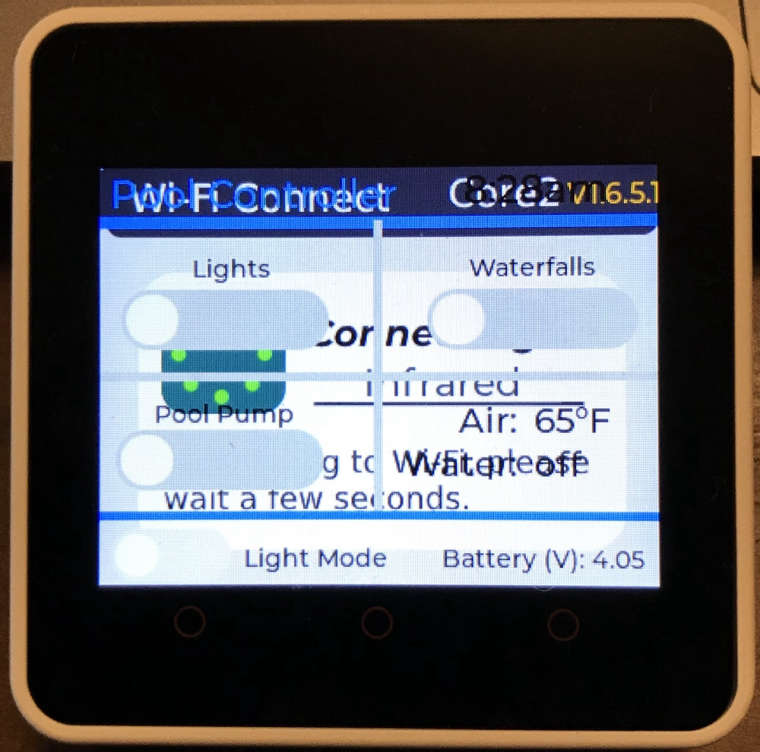
@m5stack, please note this bug and see if you can fix it.
By the way, for me it only happens when I download the program to the Core2. When pressing the Run button in uiFlow, I do not see the graphics issue.
-
This post is deleted! -
Yes. Only when downloaded.
Occurs with "screen" followed by "m5mqtt" in Python's auto-generation.
--- Blockly ---
screen = M5Screen ()
screen.clean_screen ()
screen.set_screen_bg_color (0xFFFFFF)
m5mqtt = M5mqtt ('','*. *. *. *', 1883,'','', 300)
...Rewritten with Python I overwrote the "Wi-Fi Connect Core 2" screen and erased it.
--- Python ---
m5mqtt = M5mqtt ('','*. *. *. *', 1883,'','', 300)
screen = M5Screen ()
screen.clean_screen ()
screen.set_screen_bg_color (0xFFFFFF)
...However, it is strange that the "Wi-Fi Connect Core2" screen is displayed with "m5mqtt".
-
Hi Guys, I noted this bug and will look into it. Will try to re-produce it and see what's going on
-
I am grateful for your prompt handling.
-
@ikabou Bug confirmed and reported, we will release a fix in the next update.


Hello! It looks like you're interested in this conversation, but you don't have an account yet.
Getting fed up of having to scroll through the same posts each visit? When you register for an account, you'll always come back to exactly where you were before, and choose to be notified of new replies (either via email, or push notification). You'll also be able to save bookmarks and upvote posts to show your appreciation to other community members.
With your input, this post could be even better 💗
Register Login