UI Flow2 UTC time issue
-
I am using a Core S3 with UI Flow2 and having trouble with the RTC functions
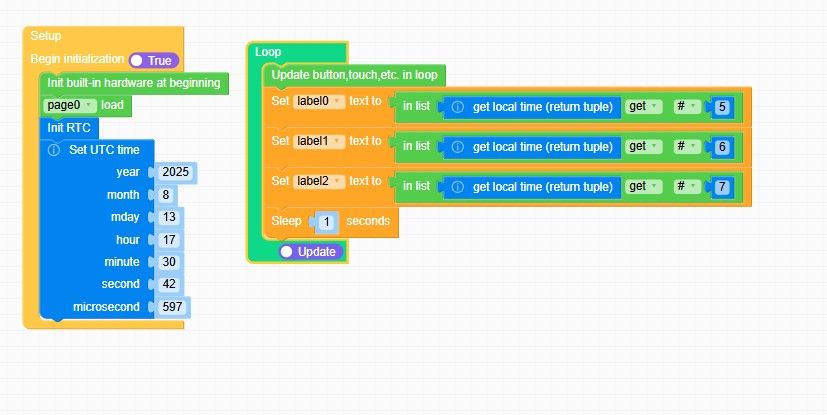
While the year month and day information of the tuple are correct, the hour and minute are not
Hour is displayed as 0 instead of 17 and minutes are 17 instead of 31.
Seconds are correct.
I get the same results with a Core 2 under UI Flow2
Reverting to UI Flow 1 and Core 2, The information is correct.As I examine the python code generated by the blocs, they appear correct to me.
Thanks a lot for your suggestions -
@csierra67 I reported this just a few days ago and the bug has been passed on the the team. See my post here https://community.m5stack.com/topic/7744/rtc-serious-bug-easy-fix-for-development-team
The block is calling rtc.init(...), it should be calling rtc.datetime(...)
-
@gektron thanks for the clarification, I am hoping M5 will fix it. It seems it has been there for a while. I burned my devices with an older version of UI flow2 and the bug is already existing
-
@csierra67 Further to this suggestion, I tried the mpy route but got an error, type mismatch and the device frozen during upload needed to be burned again to recover control
Finally I tried to not set the time and work with the Time section rather than the RTC section with the assumption that the device being connected to Internet anyway, it would get the correct time by itself.
The following example works flawlessly and closes my issue as a reference for fuuture developpers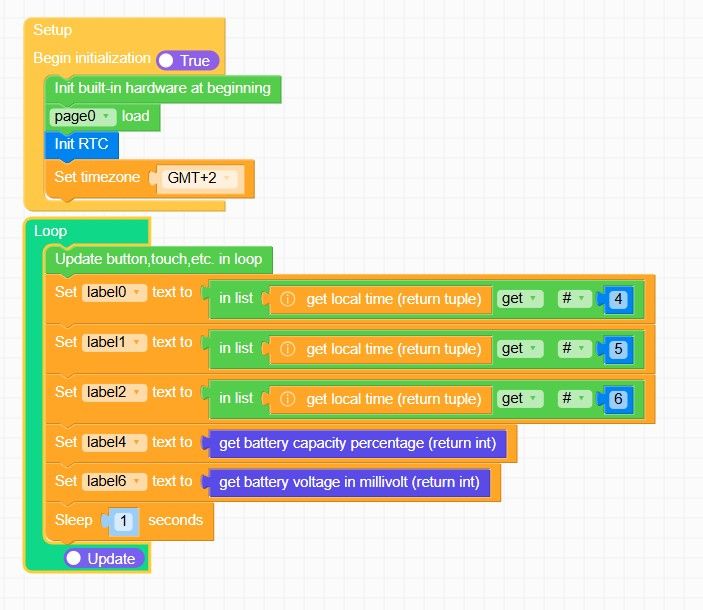
Hello! It looks like you're interested in this conversation, but you don't have an account yet.
Getting fed up of having to scroll through the same posts each visit? When you register for an account, you'll always come back to exactly where you were before, and choose to be notified of new replies (either via email, or push notification). You'll also be able to save bookmarks and upvote posts to show your appreciation to other community members.
With your input, this post could be even better 💗
Register Login