UIFlow 2 Button blocks broken
-
Hi All,
In UIFLow 2.0 the button blocks have recently become broken. In the drop down on the top of the block that performs an action when either button A,B or C is pressed, the option now only exists for button A:
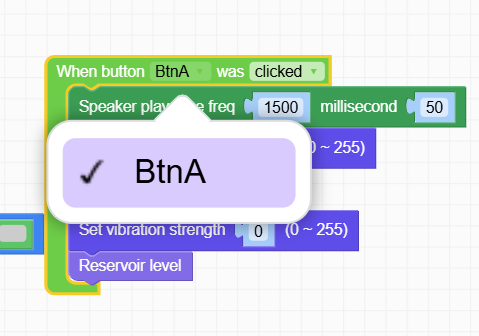
I am using the Core 2.
Edit: I have seen that all other devices in UIFLow2.0 do not have buttons B or C and I have double checked to make sure the Core2 is selected and it is. This also affects all of my UIFlow2.0 projects
-
Hello @ewoodier84
hmm, I am not seeing that. I get to select from all three buttons in UIFlow2 V2.2.3 with M5Core2 selected.
The same is true when I load some of my older UIFlow2 programs.
Which browser are you using? I think UIFlow2 only works properly in Chrome. Maybe try to clear the cache?
Thanks
Felix -
I am using chrome, I will try a cache clear. This applies both to new button blocks and existing in all projects. Any button blocks that had buttons B or C selected have reverted to button A in all of my projects.
Edit: Clearing cache did not work but on another laptop I can see all three buttons, definitely some kind of local issue.

Hello! It looks like you're interested in this conversation, but you don't have an account yet.
Getting fed up of having to scroll through the same posts each visit? When you register for an account, you'll always come back to exactly where you were before, and choose to be notified of new replies (either via email, or push notification). You'll also be able to save bookmarks and upvote posts to show your appreciation to other community members.
With your input, this post could be even better 💗
Register Login