[Solved] M5 Burner Firmware Option Update
-
the windows link i posted is the uiflow firmware loader but it has the camera firmware in the package.
-
Thanks for coming back to me.
So which one do I choose please?
-
For the MK1 (no case) use cam0.02
For the MK2 with PSRam use M5Cam-psram
I do believe the fisheye also uses the M5Cam-psram firmware. -
For the MK1 (no case) use cam0.02
This is my camera;
I have UIFLow-v 1.2.3-en loaded and I have setup an IP address but nothing is loading.
The options I have are on the image I loaded - I see no cam0.02?
Thanks
-
@gachapo There should be an option in the top dropdown box to select it.

Click on the box next to firmware
-
Click on the M5Flow-v1.2.1-en and a box will drop down, scroll through the list and the cam firmware is near the top.
-
That's my point - there's nothing more than the image I sent.
The only choices I have are on the left and the only drop down boxes are at the top and relate to the COM port and Baud rate??
-
@gachapo said in M5 Burner Firmware Option Update:
That's my point - there's nothing more than the image I sent.
The only choices I have are on the left and the only drop down boxes are at the top and relate to the COM port and Baud rate??
Sorry No image has appeared.
-
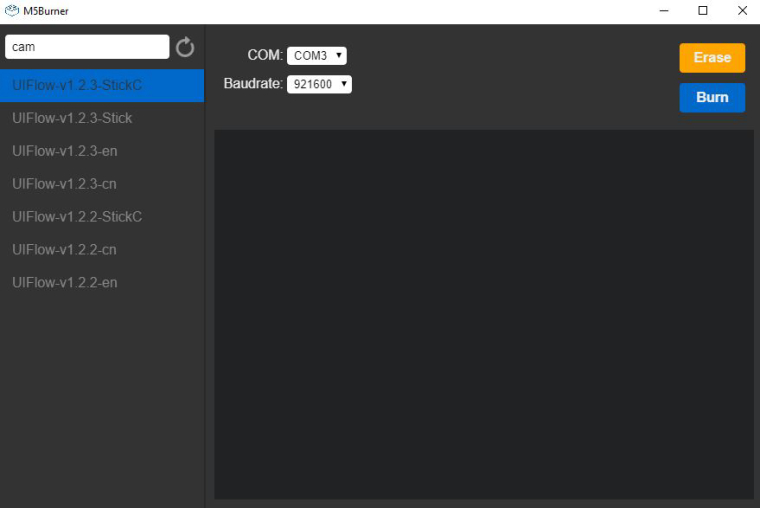
-
@gachapo said in M5 Burner Firmware Option Update:
Um, something is not quite correct there!
@watson -
An alternative is that you can download the source code and compile it yourself.
-
I could, if I knew how.
I was hoping somebody would know why I cant use the burner?
-
Now, you could burn camera board firmwares through the lastest m5burner. Please download the lastest version from www.m5stack.com
-
@watson Thanks for coming back to me.
I have downloaded the new version and I have tried all three versions of cam software. None of them go into AP mode so I can browse to them. I have the Camera without the case so can you please let me know which software I use and how I get it sdet up beyond download.
Thanks
-
@gachapo Download a new one from www.m5stack.com, then burn
ESP32CAM-v1.0.0. Your board is namedESP32CAM.
Here's the doc for it.
https://docs.m5stack.com/#/en/unit/esp32cam -
That's great thank you - works.
Is there any documentation about how to assign your own IP address to the camera please?
-
@gachapo Do you mean this doc?
https://docs.m5stack.com/#/en/quick_start/m5camera/m5camera_quick_start
-
Hi,
I've see that document and youtube video. I just need to know how to move the camera from M5stack AP connection on 192.168.4.1 to an assigned ip address by myself like 192.168.1.131?
Thanks
-
@gachapo you need to recompile the code is ST mode and upload to cameea
-
@ajb2k3 Thanks - Is there any documentation you can point me to please?


Hello! It looks like you're interested in this conversation, but you don't have an account yet.
Getting fed up of having to scroll through the same posts each visit? When you register for an account, you'll always come back to exactly where you were before, and choose to be notified of new replies (either via email, or push notification). You'll also be able to save bookmarks and upvote posts to show your appreciation to other community members.
With your input, this post could be even better 💗
Register Login