MQTT SUbscribe is not working, after a few
-
Hey
Im using a CoreS3 with UIFLow2.
I have a few powerwalls, flashed with tasmota - and using iobroker as a mqtt server.
so my flow looks like that:
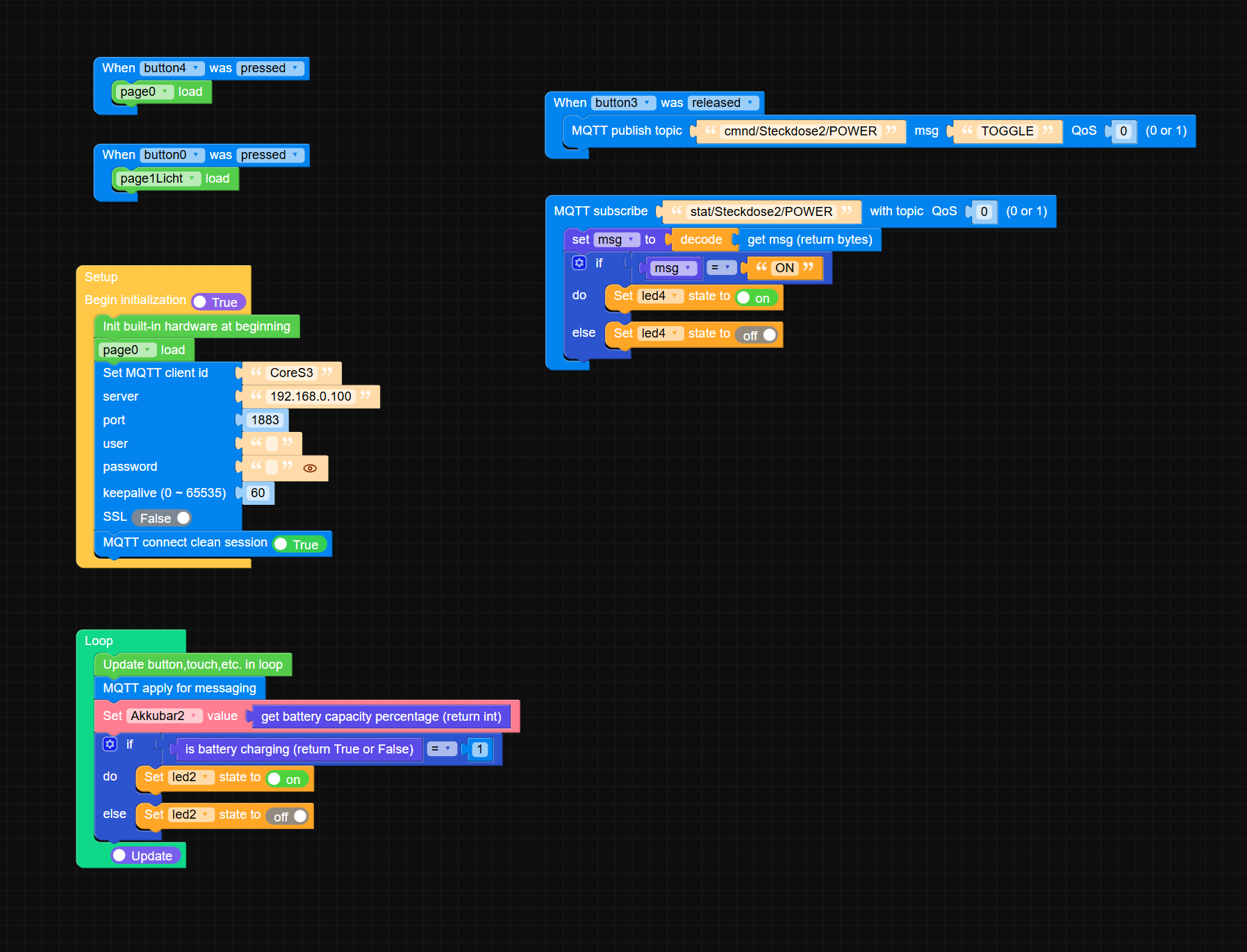
This is my screen for that "problematic" content:
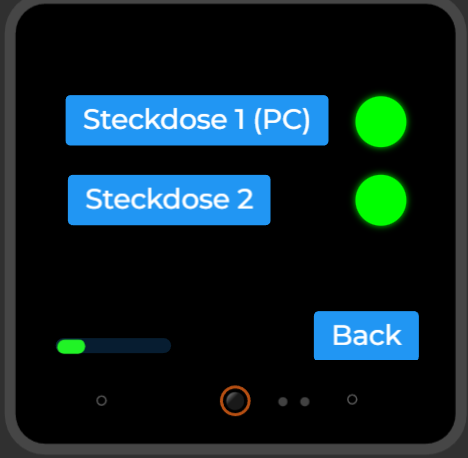
if i restart the coreS3, i can switch on and of the powerwall - and the led indicator works instant. BUT after a while, i can switch on and of the powerwall, but the led wont change anymore - or takes minutes, to do so.
in the iobroker mqtt i can see, that the tasmota device changed its status to "on" instant, so its switched on - but the led on the screen dont tell that.
if i restart the unit, it works again, for a few minutes.
any ideas?
-
So, because nobody cares - and the M5Stack might be abadoned by the company - here the solution - found it by myself....
The Blockly is doing crap - and cant be fixed in there, u have to learn micropython...i asked a friend - and he had the following solution:
import os, sys, io
import M5
from M5 import *
import m5ui
import lvgl as lv
from umqtt import MQTTClient
import time

page0 = None
page1Licht = None
button0 = None
button1 = None
Akkubar2 = None
led0 = None
led2 = None
charge = None
button2 = None
button3 = None
led3 = None
led4 = None
button4 = None
mqtt_client = None

msg = None
last_ui_update = 0   # <---- UI Timing


# ---------- MQTT EVENTS ----------

def mqtt_stat_Steckdose2_POWER_event(data):
    global led4, msg
    msg = (data[1]).decode()
    led4.on() if msg == 'ON' else led4.off()
    print("Steckdose2:", msg)


def mqtt_stat_Steckdose1_POWER_event(data):
    global led3, msg
    msg = (data[1]).decode()
    led3.on() if msg == 'ON' else led3.off()
    print("Steckdose1:", msg)


# ---------- MQTT CONNECT / RECONNECT ----------

def mqtt_connect():
    global mqtt_client
    print("MQTT connecting...")

    try:
        mqtt_client = MQTTClient('CoreS3', '192.168.0.100', port=1883,
                                 user='', password='', keepalive=60)

        mqtt_client.connect(clean_session=False)

        mqtt_client.subscribe('stat/Steckdose2/POWER', mqtt_stat_Steckdose2_POWER_event, qos=0)
        mqtt_client.subscribe('stat/Steckdose1/POWER', mqtt_stat_Steckdose1_POWER_event, qos=0)

        print("MQTT connected & subscribed.")
        time.sleep(0.2)
    except Exception as e:
        print("MQTT connect failed:", e)
        time.sleep(2)


# ---------- BUTTON EVENTS ----------

def button4_pressed_event(event_struct):
    page0.screen_load()

def button0_pressed_event(event_struct):
    page1Licht.screen_load()

def button3_released_event(event_struct):
    mqtt_client.publish('cmnd/Steckdose2/POWER', 'TOGGLE', qos=0)

def button2_released_event(event_struct):
    mqtt_client.publish('cmnd/Steckdose1/POWER', 'TOGGLE', qos=0)


# ---------- UI EVENT HANDLER ----------

def button4_event_handler(event_struct):
    if event_struct.code == lv.EVENT.PRESSED:
        button4_pressed_event(event_struct)

def button0_event_handler(event_struct):
    if event_struct.code == lv.EVENT.PRESSED:
        button0_pressed_event(event_struct)

def button3_event_handler(event_struct):
    if event_struct.code == lv.EVENT.RELEASED:
        button3_released_event(event_struct)

def button2_event_handler(event_struct):
    if event_struct.code == lv.EVENT.RELEASED:
        button2_released_event(event_struct)


# ---------- SETUP ----------

def setup():
    global page0, page1Licht, button0, button1, Akkubar2, led0, led2, charge, button2, button3, led3, led4, button4

    M5.begin()
    Widgets.setRotation(1)
    m5ui.init()

    page0 = m5ui.M5Page(bg_c=0x000000)
    page1Licht = m5ui.M5Page(bg_c=0x000000)
    button0 = m5ui.M5Button(text="Licht", x=114, y=23, bg_c=0x2196f3, text_c=0xffffff, font=lv.font_montserrat_24, parent=page0)
    button1 = m5ui.M5Button(text="Automation", x=71, y=137, bg_c=0x2196f3, text_c=0xffffff, font=lv.font_montserrat_24, parent=page0)
    Akkubar2 = m5ui.M5Bar(x=4, y=220, w=100, h=13, min_value=0, max_value=100, value=25, bg_c=0x2193f3, color=0x21f326, parent=page1Licht)
    led0 = m5ui.M5LED(x=7, y=187, size=20, color=0x00ff00, on=True, parent=page1Licht)
    led2 = m5ui.M5LED(x=297, y=215, size=20, color=0x00ff00, on=True, parent=page0)
    charge = m5ui.M5Label("CHAR", x=248, y=217, text_c=0xffffff, bg_c=0xffffff, bg_opa=0, font=lv.font_montserrat_14, parent=page0)
    button2 = m5ui.M5Button(text="Steckdose 1 (PC)", x=12, y=9, bg_c=0x2196f3, text_c=0xffffff, font=lv.font_montserrat_24, parent=page1Licht)
    button3 = m5ui.M5Button(text="Steckdose 2", x=14, y=78, bg_c=0x2196f3, text_c=0xffffff, font=lv.font_montserrat_24, parent=page1Licht)
    led3 = m5ui.M5LED(x=263, y=10, size=44, color=0x00ff00, on=True, parent=page1Licht)
    led4 = m5ui.M5LED(x=263, y=78, size=44, color=0x00ff00, on=True, parent=page1Licht)
    button4 = m5ui.M5Button(text="Back", x=227, y=196, bg_c=0x2196f3, text_c=0xffffff, font=lv.font_montserrat_24, parent=page1Licht)

    button4.add_event_cb(button4_event_handler, lv.EVENT.ALL, None)
    button0.add_event_cb(button0_event_handler, lv.EVENT.ALL, None)
    button3.add_event_cb(button3_event_handler, lv.EVENT.ALL, None)
    button2.add_event_cb(button2_event_handler, lv.EVENT.ALL, None)

    page0.screen_load()
    mqtt_connect()

    Power.setChargeCurrent(1000)
    Power.setChargeVoltage(4100)


# ---------- LOOP ----------

def loop():
    global last_ui_update

    # ---- MQTT schnell abfragen -> verhindert Verzögerungen
    for _ in range(5):
        try:
            mqtt_client.check_msg()
        except:
            mqtt_connect()

    if not mqtt_client.isconnected():
        mqtt_connect()

    # ---- UI nur alle 100ms aktualisieren (entkoppelt)
    now = time.ticks_ms()
    if time.ticks_diff(now, last_ui_update) > 100:
        last_ui_update = now

        M5.update()
        Akkubar2.set_value(Power.getBatteryLevel(), True)
        led2.on() if Power.isCharging() else led2.off()
        led0.on() if mqtt_client.isconnected() else led0.off()


# ---------- MAIN ----------

if __name__ == '__main__':
    try:
        setup()
        while True:
            loop()
    except (Exception, KeyboardInterrupt) as e:
        try:
            m5ui.deinit()
            from utility import print_error_msg
            print_error_msg(e)
        except ImportError:
            print("please update to latest firmware")
That is working instant, and over a long time. the led indicator switches instant and real.
The issue is, that the LVGL render takes so long, that the subscribed message dont come trough. its a bug in the blockly implementation, but it never gets fixed, because it seems, the M5Stack is abadoned....so u have to fix it in the mircopython code - and never get back to blockly - or u loose the code ^^
Hello! It looks like you're interested in this conversation, but you don't have an account yet.
Getting fed up of having to scroll through the same posts each visit? When you register for an account, you'll always come back to exactly where you were before, and choose to be notified of new replies (either via email, or push notification). You'll also be able to save bookmarks and upvote posts to show your appreciation to other community members.
With your input, this post could be even better 💗
Register Login