M5 Unit Scroll Arduino Example
-
Hi All, I can't find an Arduino example about Unit Scroll.. I would like to implement selection and click...M5Unit-Scroll
best regards
-
this code doesn't work
#include <M5Atom.h>
#include <M5UnitScroll.h>

M5UnitScroll Scroll;

int myVariable = 0;
int previousEncoderValue = 0;
bool buttonPressed = false;

void setup() {
  M5.begin();
  Serial.begin(115200);
  Scroll.begin(&Wire, 0x40, 26, 32);
}

void loop() {
  int currentEncoderValue = Scroll.getEncoderValue();
  int difference = currentEncoderValue - previousEncoderValue;
  myVariable += difference;
  previousEncoderValue = currentEncoderValue;

  if (Scroll.getButtonStatus()) {
    if (!buttonPressed) {
      myVariable = 0;
      buttonPressed = true;
    }
  } else {
    buttonPressed = false;
  }
  Serial.print("myVariable ");
  Serial.println(myVariable);
  Serial.print("buttonPressed ");
  Serial.println(buttonPressed);
}
some tips?
-
@cepics Have you checked whether M5UnitScroll.begin returns true? Baybe that gives a clue.
Regards -
@HappyUser I'm not sure how to check the begin function return value..
I tried:#include <M5Atom.h> #include "M5UnitScroll.h" M5UnitScroll Scroll; bool scrolla; void setup() { M5.begin(); Serial.begin(115200); Scroll.begin(); } void loop() { scrolla = Scroll.begin(); Serial.println(scrolla); delay(1000); scrolla = Scroll.begin(&Wire, SCROLL_ADDR, 32, 26); Serial.println(scrolla); delay(1000); scrolla = Scroll.begin(&Wire, SCROLL_ADDR, 26, 32); Serial.println(scrolla); delay(1000); }and the output in the serial monitor is:
10:56:20.024 -> 0 10:56:21.044 -> 0 10:56:22.062 -> 0 10:56:23.084 -> 0 10:56:24.071 -> 0 10:56:25.092 -> 0 10:56:26.081 -> 0 10:56:27.102 -> 0 10:56:28.129 -> 0 -
I tried an i2c scanner (not the atom one that doesn't work):
#include <Wire.h>

void setup()
{
  Wire.begin(26, 32);

  Serial.begin(115200);
  while (!Serial);             // Leonardo: wait for serial monitor
  Serial.println("\nI2C Scanner");
}

void loop()
{
  byte error, address;
  int nDevices;

  Serial.println("Scanning...");

  nDevices = 0;
  for(address = 1; address < 127; address++ )
  {
    // The i2c_scanner uses the return value of
    // the Write.endTransmisstion to see if
    // a device did acknowledge to the address.
    Wire.beginTransmission(address);
    error = Wire.endTransmission();

    if (error == 0)
    {
      Serial.print("I2C device found at address 0x");
      if (address<16)
        Serial.print("0");
      Serial.print(address,HEX);
      Serial.println("  !");

      nDevices++;
    }
    else if (error==4)
    {
      Serial.print("Unknown error at address 0x");
      if (address<16)
        Serial.print("0");
      Serial.println(address,HEX);
    }
  }
  if (nDevices == 0)
    Serial.println("No I2C devices found\n");
  else
    Serial.println("done\n");

  delay(5000);           // wait 5 seconds for next scan
}
and I can see 0x40
next I tried to put in two tab the modified library M5UnitScroll.h (for scl end sda atom pin) and M5UnitScroll.cpp..
M5UnitScroll.h
/*
 * SPDX-FileCopyrightText: 2024 M5Stack Technology CO LTD
 *
 * SPDX-License-Identifier: MIT
 */
#ifndef _M5UNITSCROLL_H_
#define _M5UNITSCROLL_H_

#include "Arduino.h"
#include "Wire.h"
#include "pins_arduino.h"

#define SCROLL_ADDR            0x40
#define ENCODER_REG             0x10
#define BUTTON_REG             0x20
#define RGB_LED_REG            0x30
#define RESET_REG              0x40
#define INC_ENCODER_REG         0x50
#define BOOTLOADER_VERSION_REG 0xFC
#define JUMP_TO_BOOTLOADER_REG 0xFD
#define FIRMWARE_VERSION_REG   0xFE
#define I2C_ADDRESS_REG        0xFF

class M5UnitScroll {
   private:
    uint8_t _addr;
    TwoWire* _wire;
    uint8_t _scl;
    uint8_t _sda;
    uint32_t _speed;
    void writeBytes(uint8_t addr, uint8_t reg, uint8_t* buffer, uint8_t length);
    void readBytes(uint8_t addr, uint8_t reg, uint8_t* buffer, uint8_t length);

   public:
    bool begin(TwoWire* wire = &Wire, uint8_t addr = SCROLL_ADDR, uint8_t sda = 26, uint8_t scl = 32, uint32_t speed = 400000U);
    int32_t getEncoderValue(void);
    int32_t getIncEncoderValue(void);
    bool getButtonStatus(void);
    void setLEDColor(uint32_t color, uint8_t index = 0);
    uint32_t getLEDColor(void);
    void setEncoderValue(int32_t encoder);
    void resetEncoder(void);
    bool getDevStatus(void);
    uint8_t getBootloaderVersion(void);
    uint8_t getFirmwareVersion(void);
    uint8_t setI2CAddress(uint8_t addr);
    uint8_t getI2CAddress(void);
    void jumpBootloader(void);
};

#endif
and M5UnitScroll.cpp
/*
 * SPDX-FileCopyrightText: 2024 M5Stack Technology CO LTD
 *
 * SPDX-License-Identifier: MIT
 */
#include "M5UnitScroll.h"

/*! @brief Initialize the Encoder. */
bool M5UnitScroll::begin(TwoWire *wire, uint8_t addr, uint8_t sda, uint8_t scl, uint32_t speed) {
    _wire  = wire;
    _addr  = addr;
    _sda   = sda;
    _scl   = scl;
    _speed = speed;
    _wire->begin(_sda, _scl);
    _wire->setClock(_speed);
    delay(10);
    _wire->beginTransmission(_addr);
    uint8_t error = _wire->endTransmission();
    if (error == 0) {
        return true;
    } else {
        return false;
    }
}

/*! @brief Write a certain length of data to the specified register address. */
void M5UnitScroll::writeBytes(uint8_t addr, uint8_t reg, uint8_t *buffer, uint8_t length) {
    _wire->beginTransmission(addr);
    _wire->write(reg);
    for (int i = 0; i < length; i++) {
        _wire->write(*(buffer + i));
    }
    _wire->endTransmission();
}

/*! @brief Read a certain length of data to the specified register address. */
void M5UnitScroll::readBytes(uint8_t addr, uint8_t reg, uint8_t *buffer, uint8_t length) {
    uint8_t index = 0;
    _wire->beginTransmission(addr);
    _wire->write(reg);
    _wire->endTransmission(false);
    _wire->requestFrom(addr, length);
    for (int i = 0; i < length; i++) {
        buffer[index++] = _wire->read();
    }
}

/*! @brief Read the encoder value.
    @return The value of the encoder that was read */
int32_t M5UnitScroll::getEncoderValue(void) {
    int32_t value = 0;

    readBytes(_addr, ENCODER_REG, (uint8_t *)&value, 4);
    return value;
}

/*! @brief Read the encoder inc value.
    @return The value of the encoder that was read */
int32_t M5UnitScroll::getIncEncoderValue(void) {
    int32_t value = 0;

    readBytes(_addr, INC_ENCODER_REG, (uint8_t *)&value, 4);
    return value;
}

/*! @brief Get the current status of the rotary encoder button.
    @return true if the button was pressed, otherwise false. */
bool M5UnitScroll::getButtonStatus(void) {
    uint8_t data;
    readBytes(_addr, BUTTON_REG, &data, 1);
    return data == 0x00;
}

/*! @brief Set the color of the LED (HEX). */
void M5UnitScroll::setLEDColor(uint32_t color, uint8_t index) {
    uint8_t data[4];
    data[3] = color & 0xff;
    data[2] = (color >> 8) & 0xff;
    data[1] = (color >> 16) & 0xff;
    data[0] = index;
    writeBytes(_addr, RGB_LED_REG, data, 4);
}

/*! @brief Get the color of the LED (HEX).
    @return The value of the led that was read */
uint32_t M5UnitScroll::getLEDColor(void) {
    uint8_t data[4];
    uint32_t value = 0;

    readBytes(_addr, RGB_LED_REG, data, 4);
    value = (data[3] | (data[2] << 8) | (data[1] << 16));
    return value;
}

void M5UnitScroll::setEncoderValue(int32_t encoder) {
    writeBytes(_addr, ENCODER_REG, (uint8_t *)&encoder, 4);
}

void M5UnitScroll::resetEncoder(void) {
    uint8_t data = 1;
    writeBytes(_addr, 0x40, &data, 1);
}

/*! @brief Get the dev status.
    @return 1 if the dev working, otherwise 0.. */
bool M5UnitScroll::getDevStatus(void) {
    _wire->beginTransmission(_addr);
    if (_wire->endTransmission() == 0)
        return true;
    else
        return false;
}

uint8_t M5UnitScroll::getBootloaderVersion(void) {
    _wire->beginTransmission(_addr);
    _wire->write(BOOTLOADER_VERSION_REG);
    _wire->endTransmission(false);

    uint8_t RegValue;

    _wire->requestFrom(_addr, 1);
    RegValue = _wire->read();
    return RegValue;
}

uint8_t M5UnitScroll::getFirmwareVersion(void) {
    _wire->beginTransmission(_addr);
    _wire->write(FIRMWARE_VERSION_REG);
    _wire->endTransmission(false);

    uint8_t RegValue;

    _wire->requestFrom(_addr, 1);
    RegValue = _wire->read();
    return RegValue;
}

uint8_t M5UnitScroll::setI2CAddress(uint8_t addr) {
    uint8_t temp[2] = {0};

    temp[0] = I2C_ADDRESS_REG;

    _wire->beginTransmission(_addr);
    _wire->write(temp[0]);
    _wire->write(addr);
    _wire->endTransmission();
    _addr = addr;
    return _addr;
}

uint8_t M5UnitScroll::getI2CAddress(void) {
    uint8_t temp[2] = {0};

    temp[0] = I2C_ADDRESS_REG;

    _wire->beginTransmission(_addr);
    _wire->write(temp[0]);
    _wire->endTransmission(false);

    uint8_t RegValue;

    _wire->requestFrom(_addr, 1);
    RegValue = _wire->read();
    return RegValue;
}

void M5UnitScroll::jumpBootloader(void) {
    uint8_t value = 1;

    writeBytes(_addr, JUMP_TO_BOOTLOADER_REG, (uint8_t *)&value, 1);
}
but this code outputs "error"
#include <M5Atom.h> #include <Wire.h> #include "M5UnitScroll.h" // #include <M5UnitScroll.h> M5UnitScroll unitScroll; void setup() { M5.begin(); Serial.begin(115200); Wire.begin(26, 32); if (!unitScroll.begin()) { Serial.println("Error"); while (1); } unitScroll.setLEDColor(0x0000FF); } void loop() { int32_t encoderValue = unitScroll.getEncoderValue(); Serial.print("Valore encoder: "); Serial.println(encoderValue); if (unitScroll.getButtonStatus()) { Serial.println("Pulsante premuto!"); unitScroll.setLEDColor(0xFF0000); // Red delay(500); unitScroll.setLEDColor(0x00FF00); // Green delay(500); } delay(100); } -
Connect the 4 wires on the back of g21 and g25, and modify the program code pin code
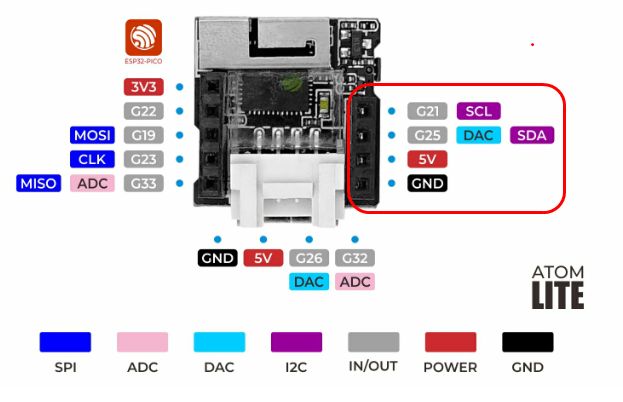
-
@flypeek … means I can’t use atom grove port to connect to scroll unit?!?
-
@flypeek this code, Atom g21 and g25 connected to the scroll grove port and library original pin assigment, works!!!
#include <M5Atom.h>
#include <M5UnitScroll.h>

M5UnitScroll unitScroll;

void setup() {
  M5.begin();
  Serial.begin(115200);

  if (!unitScroll.begin()) {
  // if (!unitScroll.begin(&Wire, 0x40, 26, 32, 400000U)) {
  // if (!unitScroll.begin(&Wire, 0x40, 32, 26, 400000U)) {
    Serial.println("Errore nell'inizializzazione del sensore");
    while (1);  // Ferma il programma in caso di errore
  }

  // LED
  unitScroll.setLEDColor(0x0000FF);
}

void loop() {
  int32_t encoderValue = unitScroll.getEncoderValue();
  Serial.print("Valore encoder: ");
  Serial.println(encoderValue);

  if (unitScroll.getButtonStatus()) {
    Serial.println("Pulsante premuto!");
    unitScroll.setLEDColor(0xFF0000);  // Rosso
    delay(500);
    unitScroll.setLEDColor(0x00FF00);  // Verde
    delay(500);
  }

  delay(100);
}
but I need to connect the unit to the Atom grove port.... some tips??
-
EUREKA!!!!
With this setup it works
  Wire.begin(26, 32);  // (sda, sck)
  M5.begin(true, false, true);
  Serial.begin(115200);
Hello! It looks like you're interested in this conversation, but you don't have an account yet.
Getting fed up of having to scroll through the same posts each visit? When you register for an account, you'll always come back to exactly where you were before, and choose to be notified of new replies (either via email, or push notification). You'll also be able to save bookmarks and upvote posts to show your appreciation to other community members.
With your input, this post could be even better 💗
Register Login