UIFlow Timer locks code?
-
I was trying to create a timer, which envokes power saving features after x amount seconds of non use/button press of the device.
When in this 'powersave' mode, any button will wake up the device (M5StickCplus2) again (which works).
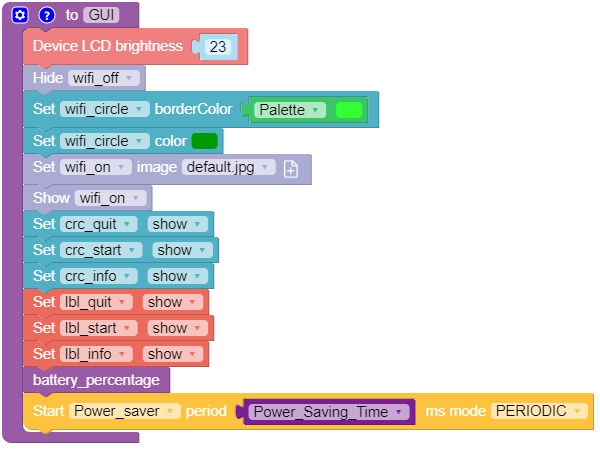
some snippets of code below:Define timer:
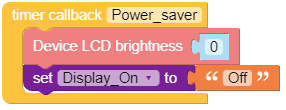
Timer Callback:
Button Press:
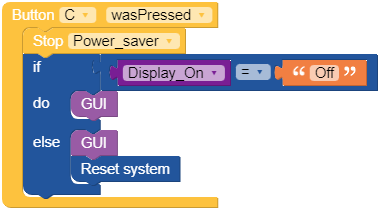
Somehow the timer locks all the processes and no action can be undertaken after the screen becomes visible again.
Any hints (or previous experience) people have with this kind of power saving methods, or is there an easier way (using UIFlow).
NOTE: UIFLow2 doesnt really work for my use case, so I gave up on that one. -
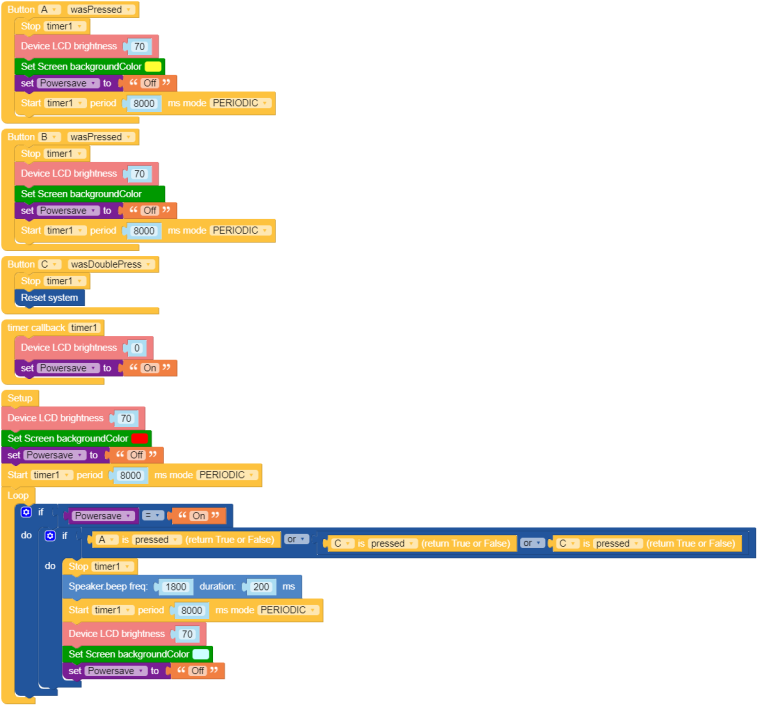
I think I cracked it. I hope this will help some people with the same issue.
@ajb2k3 , I was looking at some of the comments regarding m5.lightsleep() and m5.deepsleep(). how can you wake the device up without a timer, is there a button press option?
Hello! It looks like you're interested in this conversation, but you don't have an account yet.
Getting fed up of having to scroll through the same posts each visit? When you register for an account, you'll always come back to exactly where you were before, and choose to be notified of new replies (either via email, or push notification). You'll also be able to save bookmarks and upvote posts to show your appreciation to other community members.
With your input, this post could be even better 💗
Register Login