m5tough UIFlow2.0 Alpha 24. mqtt. first-timer needs some guidance
-
hi all,
this is all very new to me so please bear with me.
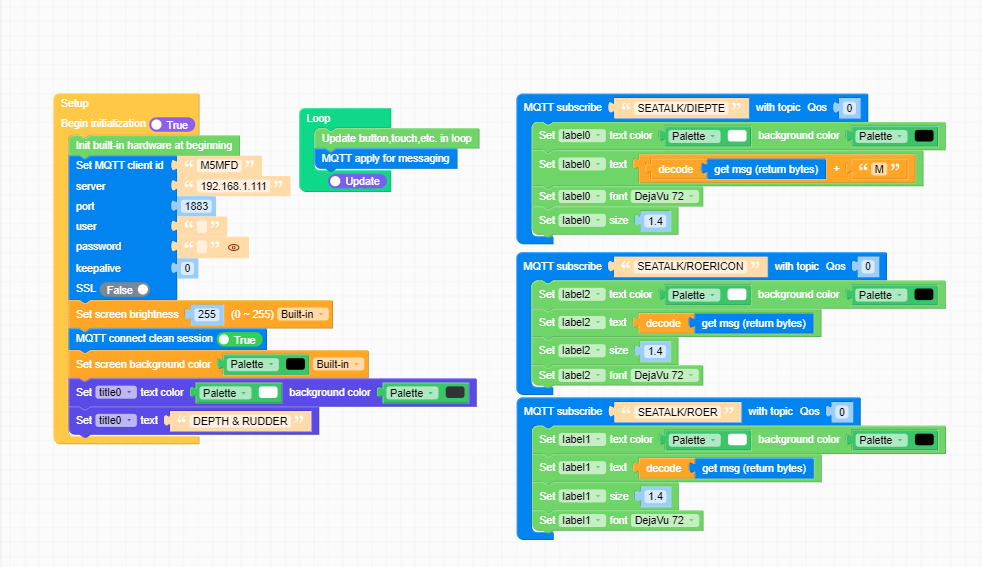
I want to use the m5 stack on my sailboat as a display for my rudder pos and depth. Both values are being published over mqtt via node red.When i run this uiflow everything works fine and the mqtt values are being displayed on the device. But when i press download to the device i get an error:
traceback (most recent call last: file "main.py" line 69, in <module>
file "main.py"line 52, setup
file "umqtt/simple.py", line 68, in connect
0SError: [Errno 118] EH0STUNREACH.what am i doing wrong ? :)
Many thanks for any advice.
import os, sys, io
import M5
from M5 import *
from umqtt import *label0 = None
label2 = None
label1 = None
triangle0 = None
title0 = None
mqtt_client = Nonedef mqtt_SEATALK_DIEPTE_event(data):
global label0, label2, label1, triangle0, title0, mqtt_client
label0.setColor(0xffffff, 0x000000)
label0.setText(str((str(((data[1]).decode())) + str('M'))))
label0.setFont(Widgets.FONTS.DejaVu72)
label0.setSize(1.4)def mqtt_SEATALK_ROER_event(data):
global label0, label2, label1, triangle0, title0, mqtt_client
label1.setColor(0xffffff, 0x000000)
label1.setText(str((data[1]).decode()))
label1.setSize(1.4)
label1.setFont(Widgets.FONTS.DejaVu72)def mqtt_SEATALK_ROERICON_event(data):
global label0, label2, label1, triangle0, title0, mqtt_client
label2.setColor(0xffffff, 0x000000)
label2.setText(str((data[1]).decode()))
label2.setSize(1.4)
label2.setFont(Widgets.FONTS.DejaVu72)def setup():
global label0, label2, label1, triangle0, title0, mqtt_clientM5.begin()
Widgets.fillScreen(0x222222)
label0 = Widgets.Label("Text", 9, 142, 1.0, 0xffffff, 0x222222, Widgets.FONTS.DejaVu18)
label2 = Widgets.Label("Text", 147, 33, 1.0, 0xffffff, 0x222222, Widgets.FONTS.DejaVu18)
label1 = Widgets.Label("Text", 10, 33, 1.0, 0xffffff, 0x222222, Widgets.FONTS.DejaVu18)
triangle0 = Widgets.Triangle(1729, 485, 1699, 515, 1759, 515, 0xffffff, 0xffffff)
title0 = Widgets.Title("Title", 3, 0xFFFFFF, 0x0000FF, Widgets.FONTS.DejaVu18)mqtt_client = MQTTClient('M5MFD', '192.168.1.111', port=1883, user='', password='', keepalive=0)
Widgets.setBrightness(255)
mqtt_client.connect(clean_session=True)
mqtt_client.subscribe('SEATALK/DIEPTE', mqtt_SEATALK_DIEPTE_event, qos=0)
mqtt_client.subscribe('SEATALK/ROER', mqtt_SEATALK_ROER_event, qos=0)
mqtt_client.subscribe('SEATALK/ROERICON', mqtt_SEATALK_ROERICON_event, qos=0)
Widgets.fillScreen(0x000000)
title0.setColor(text_c=0xffffff, bg_c=0x333333)
title0.setText('DEPTH & RUDDER')def loop():
global label0, label2, label1, triangle0, title0, mqtt_client
M5.update()
mqtt_client.wait_msg()if name == 'main':
try:
setup()
while True:
loop()
except (Exception, KeyboardInterrupt) as e:
try:
from utility import print_error_msg
print_error_msg(e)
except ImportError:
print("please update to latest firmware") -
You need a Wifi network for the data to be shared.When you test, devices are already connected to a network but when you download, you need to set a network for devices to use.
-
@ajb2k3 thanks for explaining, simply adding WLAN STA connect to SSID results in a Internal wifi error.. setting the wifi via the webburner isn't helping either. example as cheatsheet would be helpfull.
-
You need two devices, one set as AP and one as STA for it to work.
What error are you getting when set to STA? -
Thanks for explaining.

Hello! It looks like you're interested in this conversation, but you don't have an account yet.
Getting fed up of having to scroll through the same posts each visit? When you register for an account, you'll always come back to exactly where you were before, and choose to be notified of new replies (either via email, or push notification). You'll also be able to save bookmarks and upvote posts to show your appreciation to other community members.
With your input, this post could be even better 💗
Register Login