Tough can't save firmware.
-
I'm putting this in Core 2 as I don't see a Tough Core section. I can't save my firmware. Any suggestions?
-
Are you clicking run or download?
If you click run then the firmware wont be saved. you need to click download for the firmware to be permanently store on the tough. -
@ajb2k3 I'm referring to M5Burner, Firmware Exporter. I'm downloading and burning, yet can't export the firmware.
-
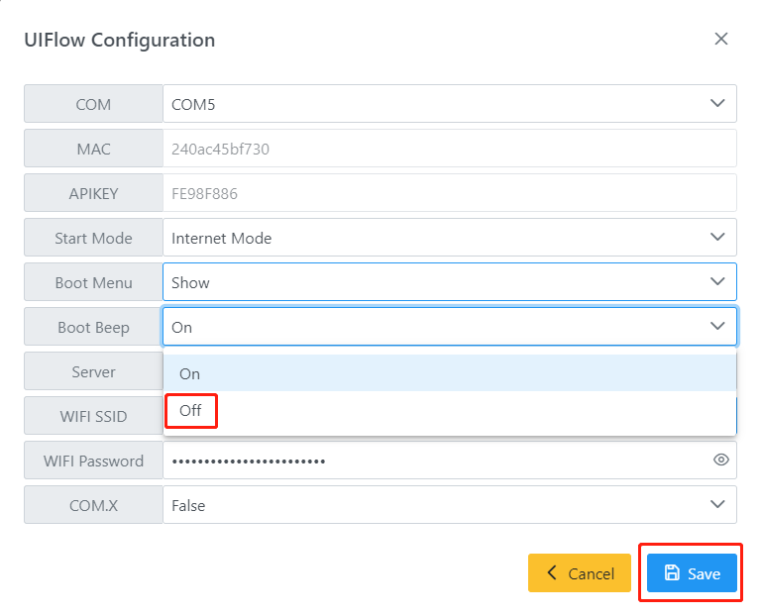
I can't access the settings to turn off the annoying start up beep as well.
-
*Select the boot beep "off" option and click the save button
*Use the latest firmware -
@pandian-nano I can't access it through M5burner.
-
Same problem here. I can't burn onto my CORE2, it doesn't see it on a COM port unlike most devices. I was thinking there was another not detecting but I think I've tried firmwares on my CORE basic and fire, CORES3, m5StickC and Atom S3. Is there a troubleshooting procedure? So I need to return it?
-
Have you installed the drivers to allow your computer to talk to the core2?
-
@ajb2k3 🤔 I believe I did. I can see my Atom Lite, Atom Matrix, AtomS3, and AtomS3 Lite.
-
Hang on I have a mighty headache this morning so need things dumned down.
Please explore how you have installed the software, connected hardware and tried to access the devices in M5Burner and are you sure you are accessing the correct com port?

Hello! It looks like you're interested in this conversation, but you don't have an account yet.
Getting fed up of having to scroll through the same posts each visit? When you register for an account, you'll always come back to exactly where you were before, and choose to be notified of new replies (either via email, or push notification). You'll also be able to save bookmarks and upvote posts to show your appreciation to other community members.
With your input, this post could be even better 💗
Register Login