UIFlow - Micropython - USB plugged in
-
Is it possible using UIFlow/Blockly to detect when USB is plugged in? From other threads (https://forum.m5stack.com/topic/3611/detecting-when-plugged-in-vs-when-charging) it looks like I need to be able to implement this:
M5.Axp.isACIN(); -
You can use this function in UIFlow:
Whenever the USB is plugged in, the battery is charged.
You will find the block in the Hardware/Power section:
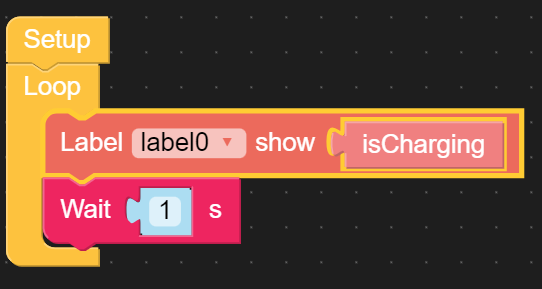
-
@crami25 said in UIFlow - Micropython - USB plugged in:
You can use this function in UIFlow:
Whenever the USB is plugged in, the battery is charged.
You will find the block in the Hardware/Power section:
Actually
isChargingreturns false after the battery goes full for a while, I realize I can then do logic to check the battery capacity, andisCharging, was just hoping there was a simpler way. -
The python version of the c function looks like its probably not available:
>>> dir(hardware.axp192.Axp192)
['__class__', '__init__', '__module__', '__name__', '__qualname__', '__bases__', '__dict__', 'deinit', 'setBusPowerMode', 'powerAll', 'setLCDBrightness', 'setPowerLED', 'setSpkEnable', 'powerOff', 'CURRENT_100MA', 'CURRENT_190MA', 'CURRENT_280MA', 'CURRENT_360MA', 'CURRENT_450MA', 'CURRENT_550MA', 'CURRENT_630MA', 'CURRENT_700MA', 'getTempInAXP192', 'getChargeState', 'getBatVoltage', 'getBatCurrent', 'getVinVoltage', 'getVinCurrent', 'getVBusVoltage', 'getVBusCurrent', 'setChargeState', 'setChargeCurrent', 'setLDOVoltage', 'setLDOEnable', 'setDCVoltage', 'disableAllIRQ', 'clearAllIRQ', 'enableBtnIRQ', 'setESPVoltage', 'setLCDBacklightVoltage', 'setLCDEnable', 'setLCDReset', 'setVibrationIntensity', 'setVibrationEnable', '_regChar', '_read8bit', '_read12Bit', '_read13Bit', '_read16Bit']
>>>
However, I found two alternative ways to detect this, i2c being my favorite: https://imgur.com/a/nscmAHF
Hello! It looks like you're interested in this conversation, but you don't have an account yet.
Getting fed up of having to scroll through the same posts each visit? When you register for an account, you'll always come back to exactly where you were before, and choose to be notified of new replies (either via email, or push notification). You'll also be able to save bookmarks and upvote posts to show your appreciation to other community members.
With your input, this post could be even better 💗
Register Login