m5Paper Screen issue
-
Hi,
since 1 month i got a m5Paper and I just ran the factory Image and some UIFlow tests.
Yesterday, after a few days i want to do some Arduino stuff with my m5Paper. I refreshed the screen and some lines are still there.
See Pic: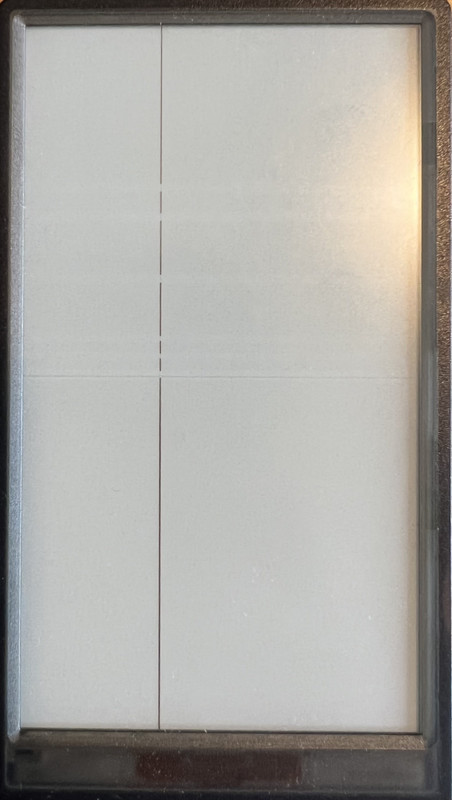
I tried a complete refresh and changed the color to black and back to white.
Those line are still persistent.
Got somebody a similar issue?
-
Hello @ebr61168
what happens if you install UIFlow firmware onto your M5Paper again? Does the line go away?
Thanks
Felix -
No, the lines persist.
Flashed the most recent uiFlow Image -
Hello @ebr61168
have you tried to fully power off and restart your M5Paper? Do do so, disconnect USB, then press the reset / power off button in the back for a couple of seconds, then reconnect USB.
Also, when you say the lines persist. Does the UIFlow screen appear on the paper display together with the lines? Or just the lines?
Thanks
Felix -
Hello felmue,
the UIFlow screen appear on the paper display together with the lines.
The screen is working fine except the persistent lines. The vertikal line got another color, it is more black and a bit shiny. -
Hello @ebr61168
I am out of ideas at this point in time, sorry.
Have you checked with M5Stack support or the shop / store you got your M5Paper from?
Thanks
Felix

Hello! It looks like you're interested in this conversation, but you don't have an account yet.
Getting fed up of having to scroll through the same posts each visit? When you register for an account, you'll always come back to exactly where you were before, and choose to be notified of new replies (either via email, or push notification). You'll also be able to save bookmarks and upvote posts to show your appreciation to other community members.
With your input, this post could be even better 💗
Register Login