🤖Have you ever tried Chat.M5Stack.com before asking??😎
    M5Stack Community
    • Categories
    • Recent
    • Tags
    • Popular
    • Users
    • Groups
    • Search
    • Register
    • Login

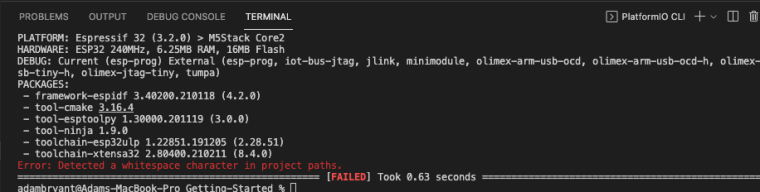
    Error: Detected a whitespace character in project paths.

    Scheduled Pinned Locked Moved Core2 for AWS
    10 Posts 5 Posters 18.3k Views 1 Watching
    Loading More Posts
    • Oldest to Newest
    • Newest to Oldest
    • Most Votes
    Reply
    • Reply as topic
    Log in to reply
    This topic has been deleted. Only users with topic management privileges can see it.
    • H Offline
      HappyUser
      last edited by HappyUser

      So my first steps in setting up a project with M5Stack AWS on my Mac OSX Big Sur (11.6). Installation of visual studio seems okay. When compiling the AWS IoT EduKit Getting Started PlatformIO Configuration File I get this error message :
      Error: Detected a whitespace character in project paths.
      Been already googling around. Not sure about the solution. I have read that I need to change the director path in a ini file. But then I am lost. Any help? Thanks

      1 Reply Last reply Reply Quote 0
      • felmueF Online
        felmue
        last edited by felmue

        Hello @HappyUser

        I think you'll need to change your project path to not contain spaces.

        In the note under Step 1. Install prerequisites it reads: Keep in mind that ESP-IDF does not support spaces in paths.

        Thanks
        Felix

        GPIO translation table M5Stack / M5Core2
        Information about various M5Stack products.
        Code examples

        H 1 Reply Last reply Reply Quote 0
        • H Offline
          HappyUser @felmue
          last edited by

          @felmue Yes thank you. I never realised that in one of my folder names I had used a white space (maybe I really need reading glasses). Now I am struggling to get my AWS blink setup and running. Will come back later with a detailed description of my challenge ;-)

          1 Reply Last reply Reply Quote 0
          • ajb2k3A Offline
            ajb2k3
            last edited by

            Ok I am confused, I'm getting the whitespace error but I can find no whitespaces anywhere! 0_1635427141841_Screenshot 2021-10-28 at 14.18.09.png
            UIFlow, so easy an adult can learn it!
            If I don't know it, be patient!
            I've ether not learned it or am too drunk to remember it!
            Author of the WIP UIFlow Handbook!
            M5Black, Go, Stick, Core2, and so much more it cant be fit in here!

            1 Reply Last reply Reply Quote 0
            • ajb2k3A Offline
              ajb2k3
              last edited by

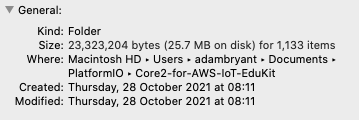
              Nevermind, I found the white space but can't do anything about it without killing my OSX install :(
              0_1635427332132_Screenshot 2021-10-28 at 14.21.33.png

              UIFlow, so easy an adult can learn it!
              If I don't know it, be patient!
              I've ether not learned it or am too drunk to remember it!
              Author of the WIP UIFlow Handbook!
              M5Black, Go, Stick, Core2, and so much more it cant be fit in here!

              1 Reply Last reply Reply Quote 0
              • R Offline
                rashedtalukder
                last edited by

                I don't see the whitespace character. Have you tried just moving the project folder to a different location?

                Head of the AWS IoT EduKit program and AWS employee. Not an M5Stack employee.

                ajb2k3A 1 Reply Last reply Reply Quote 0
                • ajb2k3A Offline
                  ajb2k3 @rashedtalukder
                  last edited by

                  @rashedtalukder said in Error: Detected a whitespace character in project paths.:

                  I don't see the whitespace character. Have you tried just moving the project folder to a different location?
                  The "White Space" is there in "Macintosh HD" managed to get my system to remove the space between Macintosh and HD and it works without my OSX crashing (OSX created the name Macintosh HD

                  UIFlow, so easy an adult can learn it!
                  If I don't know it, be patient!
                  I've ether not learned it or am too drunk to remember it!
                  Author of the WIP UIFlow Handbook!
                  M5Black, Go, Stick, Core2, and so much more it cant be fit in here!

                  1 Reply Last reply Reply Quote 0
                  • R Offline
                    rashedtalukder
                    last edited by

                    I don't know if "Macintosh HD" actually part of your path. Your path is actually /Users/adambryant/Documents/PlatformIO/Core2-for-AWS-IoT-EduKit from what I can tell. You could try using the command pwd to get your current path.

                    The other reason I wouldn't think that was the root cause is because my personal laptop, work laptop, and our test instance in EC2 are all using different versions of macOS and they say "Macintosh HD" as the label for the OS drive and I haven't seen this issue due to that.

                    Head of the AWS IoT EduKit program and AWS employee. Not an M5Stack employee.

                    1 Reply Last reply Reply Quote 1
                    • ajb2k3A Offline
                      ajb2k3
                      last edited by

                      Just got a message from the dev team saying that IDF 5.0 will finally fix the whitespace issue!

                      UIFlow, so easy an adult can learn it!
                      If I don't know it, be patient!
                      I've ether not learned it or am too drunk to remember it!
                      Author of the WIP UIFlow Handbook!
                      M5Black, Go, Stick, Core2, and so much more it cant be fit in here!

                      1 Reply Last reply Reply Quote 0
                      • H Offline
                        hacxx
                        last edited by

                        This error usually happens when your project path includes spaces (e.g., /Users/Your Name/Documents/...). Try moving your project to a folder without spaces in the path, like /Users/YourName/Projects/M5StackAWS. Then re-open the project in VS Code. That should fix the issue without needing to modify the ini file.


                        1 Reply Last reply Reply Quote 0

                        Hello! It looks like you're interested in this conversation, but you don't have an account yet.

                        Getting fed up of having to scroll through the same posts each visit? When you register for an account, you'll always come back to exactly where you were before, and choose to be notified of new replies (either via email, or push notification). You'll also be able to save bookmarks and upvote posts to show your appreciation to other community members.

                        With your input, this post could be even better 💗

                        Register Login
                        • First post
                          Last post