"\n" becomes "\\n"
-
I want to output multiline text. If I enter the text as a literal in the properties of a label, the line break is executed correctly. But if the text with the line break is in a variable \n becomes \\n. This means that the line break is no longer executed. Is this behavior intentional?
I think it is a bug that should be corrected as soon as possible.Thanks a lot
-
I guess it seems like a bug, but I'm not sure who's bug it is. The official Google Blockly does the same thing...
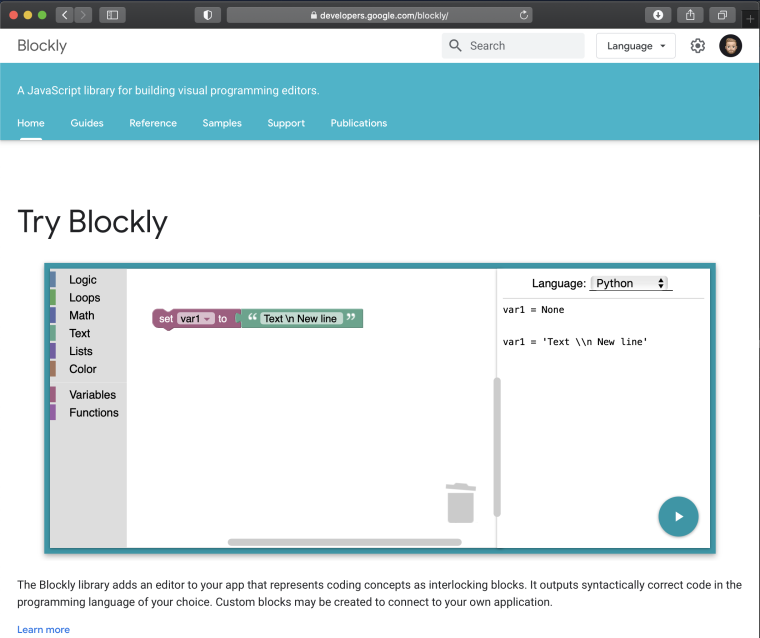
-
@world101
Then M5Stack must have taken over the problem.
I will try again with replacing "\\n" with "\n" with the appropriate text block. But still got to it because my computer had to be reinstalled. I will report back. -
the problem is probably that the parser of the uiflow editor treats the \ character as a special character and prefixes it with another character in order to display it. The effect of this is that only one character should be displayed. The problem is that after this character is encountered, the rest of the character is not taken into account. You can work around this problem by using the Execute code: block and enter the code directly
myVar = 'text\n' -
Tnx for the tipp. I'll try it.

Hello! It looks like you're interested in this conversation, but you don't have an account yet.
Getting fed up of having to scroll through the same posts each visit? When you register for an account, you'll always come back to exactly where you were before, and choose to be notified of new replies (either via email, or push notification). You'll also be able to save bookmarks and upvote posts to show your appreciation to other community members.
With your input, this post could be even better 💗
Register Login