More than one of the same units on an I2C-Bus?
-
For some units the I2C address can be changed, so that several identical units can be controlled via one I2C bus. Unfortunately I have not found a way to change the address in UIFlow or micropython.
With the PaHUB this can be avoided, but how can I control several PaHUB?
I am very reluctant to switch to the Arduino IDE. There it seems to work. Why not in Micropython? -
Hi @Peter ,
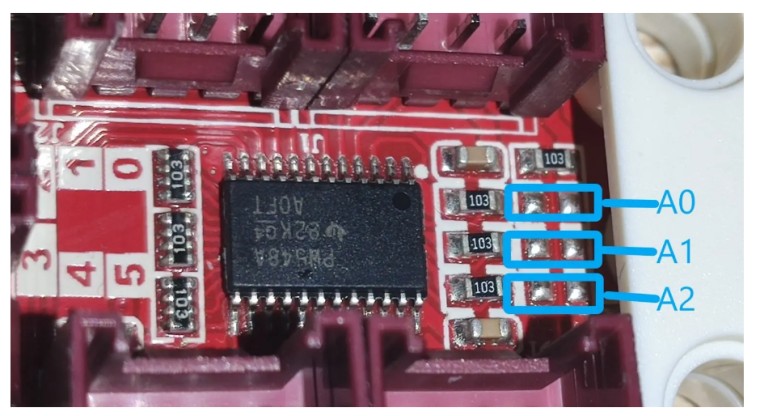
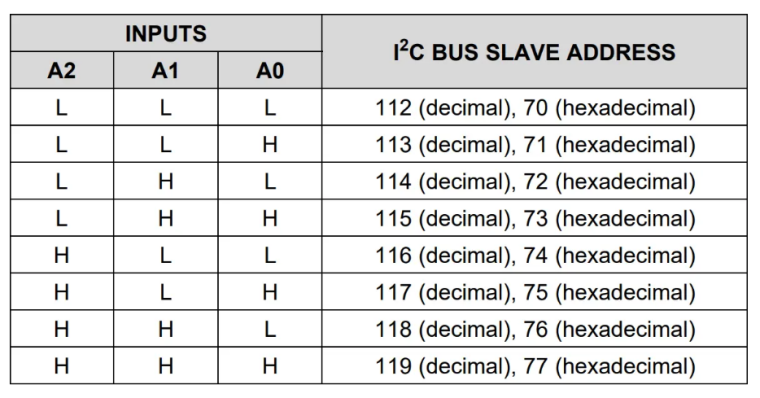
For us, the I2C address of most units is fixed so that you can use it directly. If you want to use multiple units with duplicate addresses, it is recommended that you use PAHUB, which can provide up to 5 I2C devices with the same address. Into. If you want to use multiple PAHUBs at the same time, you may need to change the position of some resistors. However, UIFlow does not currently support the selection of PAHUB addresses. We may update them in a future version.
-
@iamliubo
Thank you for the information. I was aware of the address change in the hardware. That a corresponding adjustment in the UIFlow Ide is planned fills me with joy. -
Hmmm.
I purchased 6 watering/soil moisture units... I really would wish to get practical advice how to address these units with the same controller... i am willing to learn with either uiflow/python or arduino/c..Thanks for inputs,
Alex -
Hello @luex
may I suggest you start small? (my apologies if you already have done that.)
- setup the build environment (Arduino, PlatformIO, UIFlow, ...)
- get familiar with your M5Core device
- build, download and run some simple examples (blinking an LED, put some text on screen, ...)
- now try to setup one watering/soil moisture unit using the provided example
- only if that all works try to setup multiple of them
BTW: the watering/soil moisture unit does not use I2C to communicate therefore the discussion in this thread is probably not really helpful for your situation.
Good luck!
Felix


Hello! It looks like you're interested in this conversation, but you don't have an account yet.
Getting fed up of having to scroll through the same posts each visit? When you register for an account, you'll always come back to exactly where you were before, and choose to be notified of new replies (either via email, or push notification). You'll also be able to save bookmarks and upvote posts to show your appreciation to other community members.
With your input, this post could be even better 💗
Register Login