🤖Have you ever tried Chat.M5Stack.com before asking??😎
    M5Stack Community
    • Categories
    • Recent
    • Tags
    • Popular
    • Users
    • Groups
    • Search
    • Register
    • Login

    How to change color for RGB "Set Atom Matrix"?

    Scheduled Pinned Locked Moved UIFlow
    8 Posts 5 Posters 9.3k Views
    Loading More Posts
    • Oldest to Newest
    • Newest to Oldest
    • Most Votes
    Reply
    • Reply as topic
    Log in to reply
    This topic has been deleted. Only users with topic management privileges can see it.
    • M Offline
      mb
      last edited by

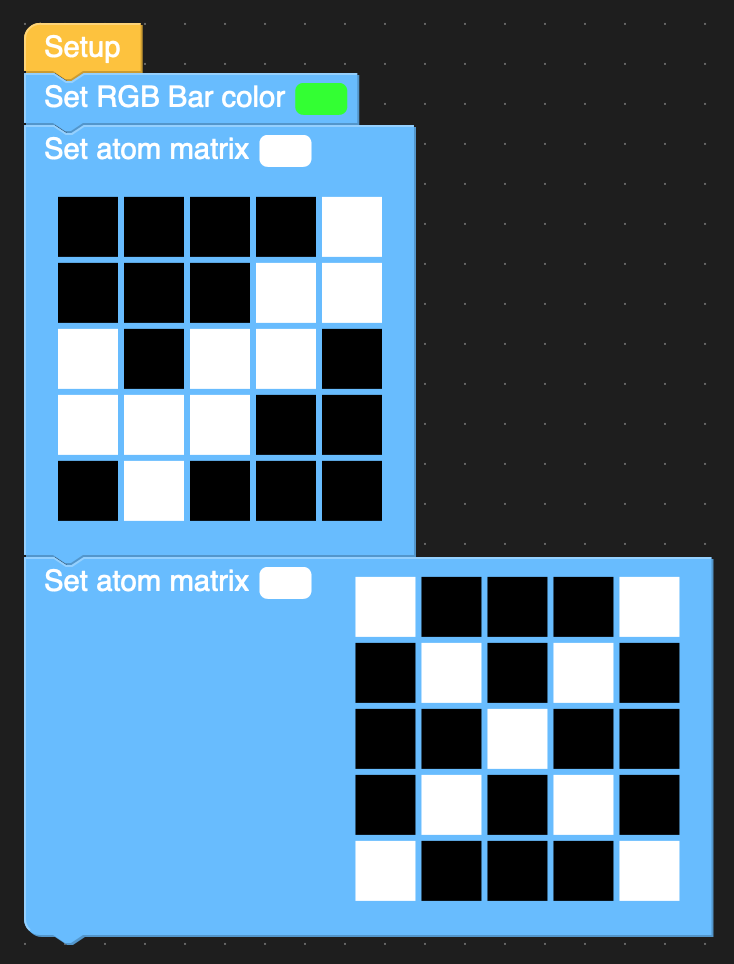
      How can I change the color when setting the atom matrix? It only shows white "pixels".
      alt text

      Setting the color before has no impact. And I can not change the color within the block.

      UIFlow v1.6.5

      Thanks
      Mike

      1 Reply Last reply Reply Quote 0
      • felmueF Offline
        felmue
        last edited by

        Hello Mike

        try clicking onto the little color rectangle next to the text 'Set atom matrix'. This should give you a color picker.

        Cheers
        Felix

        GPIO translation table M5Stack / M5Core2
        Information about various M5Stack products.
        Code examples

        1 Reply Last reply Reply Quote 0
        • ajb2k3A Offline
          ajb2k3
          last edited by

          you need to also click on the cells in the matrix block to set the colour

          UIFlow, so easy an adult can learn it!
          If I don't know it, be patient!
          I've ether not learned it or am too drunk to remember it!
          Author of the WIP UIFlow Handbook!
          M5Black, Go, Stick, Core2, and so much more it cant be fit in here!

          1 Reply Last reply Reply Quote 0
          • M Offline
            mb
            last edited by

            Clicking on the small color rectangle next to "Set atom matrix" was my first intuitive action. But nothing happens. The mouse pointer is a grapping hand when hovering over it.

            And of course I can set the 5x5 matrix fields by click, but only toggle on and off. No color change.

            1 Reply Last reply Reply Quote 0
            • felmueF Offline
              felmue
              last edited by

              Hello Mike

              hmm, the color picker is a little popup window. Maybe try a different browser?

              Felix

              GPIO translation table M5Stack / M5Core2
              Information about various M5Stack products.
              Code examples

              1 Reply Last reply Reply Quote 0
              • M Offline
                mb
                last edited by

                "Set atom matrix" module does not open the color picker - like "Set RGB Bar color".

                Tested on latest Firefox 82.0.1 and Safari 14.0 on Mac. With UIFlow V1.4.5 and V1.6.5.

                No error message in the JavaScript developer console.

                Should I officially open a bug report somewhere?

                m5stackM 1 Reply Last reply Reply Quote 0
                • m5stackM Online
                  m5stack @mb
                  last edited by

                  @mb thank you feedback we will fix it later. also, we suggest you use Chrome.

                  1 Reply Last reply Reply Quote 0
                  • B Offline
                    braddo
                    last edited by

                    I have the same problem using beta 1.6.6
                    For a bit more detail, if you create a new RGB matrix flow step it works - you can check the matrix color box and then choose the color picker and then color the pixels how you like.

                    But, if you copy a matrix flow step, the matrix color box will revert to white, and if you attempt to choose a new color for the matrix color box, it will not work, reverts to white.

                    So the way to create an animation is to choose a new matrix flow step each time.

                    But, it would be good to fix the bug, as creating animations, one always wants to start from the previous frame and then only adjust the pixels to change in that frame to the next.

                    Thanks!

                    brad

                    1 Reply Last reply Reply Quote 1

                    Hello! It looks like you're interested in this conversation, but you don't have an account yet.

                    Getting fed up of having to scroll through the same posts each visit? When you register for an account, you'll always come back to exactly where you were before, and choose to be notified of new replies (either via email, or push notification). You'll also be able to save bookmarks and upvote posts to show your appreciation to other community members.

                    With your input, this post could be even better 💗

                    Register Login
                    • First post
                      Last post